> ## Documentation Index
> Fetch the complete documentation index at: https://brightdata-ipv6-release.mintlify.site/llms.txt
> Use this file to discover all available pages before exploring further.

# 快速入门

## 如何开始使用扩展程序：

1. 要开始使用我们的扩展程序，需要确保您的 Bright Data 账户中“我的代理” 页面或“添加新区域”中至少有 1 个活跃区域。有关区域创建的更多详情，请访问我们的数据中心、 ISP、 住宅和移动指南。

<Frame>
  <img src="https://mintcdn.com/brightdata-ipv6-release/0PiiyeVKnXmtMwRa/images/scraping-automation/browser-extension/quickstart/active-proxy.png?fit=max&auto=format&n=0PiiyeVKnXmtMwRa&q=85&s=a9c7d38ff0e75f0c1fc94625b1f86022" alt="" width="1283" height="237" data-path="images/scraping-automation/browser-extension/quickstart/active-proxy.png" />
</Frame>

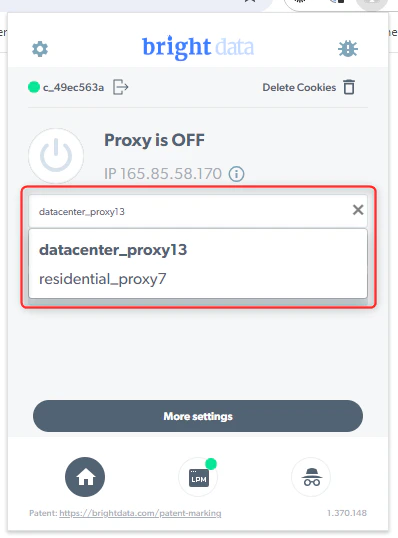
2. 在扩展程序中选择您想要使用的区域：

<Frame>
  <img src="https://mintcdn.com/brightdata-ipv6-release/0PiiyeVKnXmtMwRa/images/scraping-automation/browser-extension/quickstart/select-the-zone.png?fit=max&auto=format&n=0PiiyeVKnXmtMwRa&q=85&s=635f1253222e4fc030609eab25cfd310" alt="" width="398" height="538" data-path="images/scraping-automation/browser-extension/quickstart/select-the-zone.png" />
</Frame>

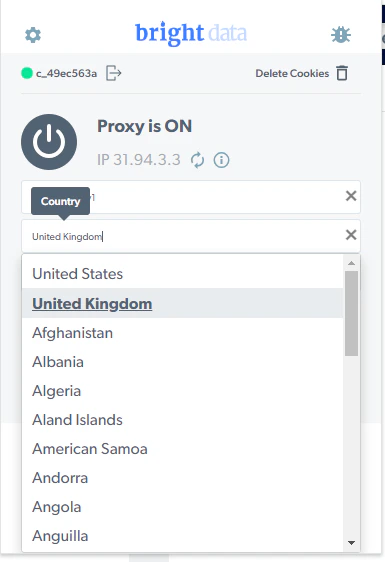
3. 选择或更改国家/地区和城市的地理位置。请注意，可以通过住宅和移动区域选择城市：

<Frame>
  <img src="https://mintcdn.com/brightdata-ipv6-release/0PiiyeVKnXmtMwRa/images/scraping-automation/browser-extension/quickstart/select-country.png?fit=max&auto=format&n=0PiiyeVKnXmtMwRa&q=85&s=d4c4c01e3d5d1025c01fa59d47e6f41d" alt="" width="385" height="562" data-path="images/scraping-automation/browser-extension/quickstart/select-country.png" />
</Frame>

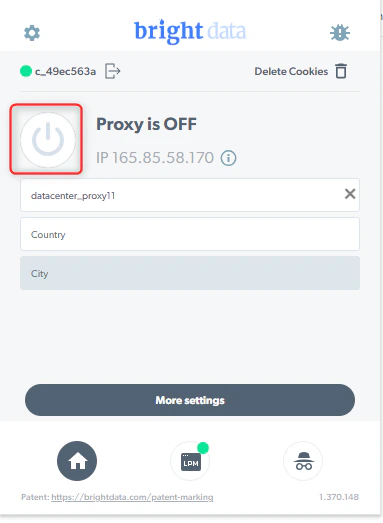
4. 打开代理并开始使用：

<Frame>
  <img src="https://mintcdn.com/brightdata-ipv6-release/0PiiyeVKnXmtMwRa/images/scraping-automation/browser-extension/quickstart/turn-on-the-proxy.png?fit=max&auto=format&n=0PiiyeVKnXmtMwRa&q=85&s=c632cd22dd9bcfb6c439b88d17da2b5f" alt="" width="383" height="523" data-path="images/scraping-automation/browser-extension/quickstart/turn-on-the-proxy.png" />
</Frame>

## 如何启用城市选择：

1. 前往控制面板“我的代理”页面
2. 点击您要启用的区域（住宅/移动）：

<Frame>
  <img src="https://mintcdn.com/brightdata-ipv6-release/0PiiyeVKnXmtMwRa/images/scraping-automation/browser-extension/quickstart/enable-proxy.png?fit=max&auto=format&n=0PiiyeVKnXmtMwRa&q=85&s=6a939452962e394a11b3eece08c4eabf" alt="" width="1409" height="280" data-path="images/scraping-automation/browser-extension/quickstart/enable-proxy.png" />
</Frame>

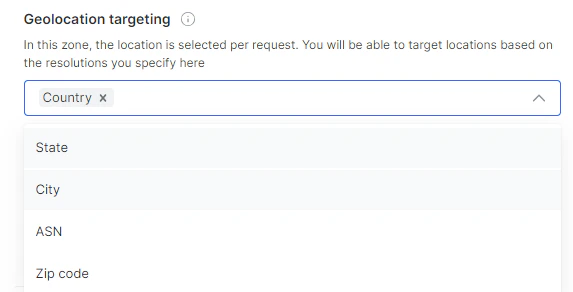
3. 前往地理位置定位，然后选择城市：

<Frame>
  <img src="https://mintcdn.com/brightdata-ipv6-release/0PiiyeVKnXmtMwRa/images/scraping-automation/browser-extension/quickstart/geolocation-targetting.png?fit=max&auto=format&n=0PiiyeVKnXmtMwRa&q=85&s=c74c1888749c9cb6389110265ba4a5ec" alt="" width="573" height="292" data-path="images/scraping-automation/browser-extension/quickstart/geolocation-targetting.png" />
</Frame>

4. 保存该区域