> ## Documentation Index
> Fetch the complete documentation index at: https://brightdata-ipv6-release.mintlify.site/llms.txt
> Use this file to discover all available pages before exploring further.
# Monitor your Usage
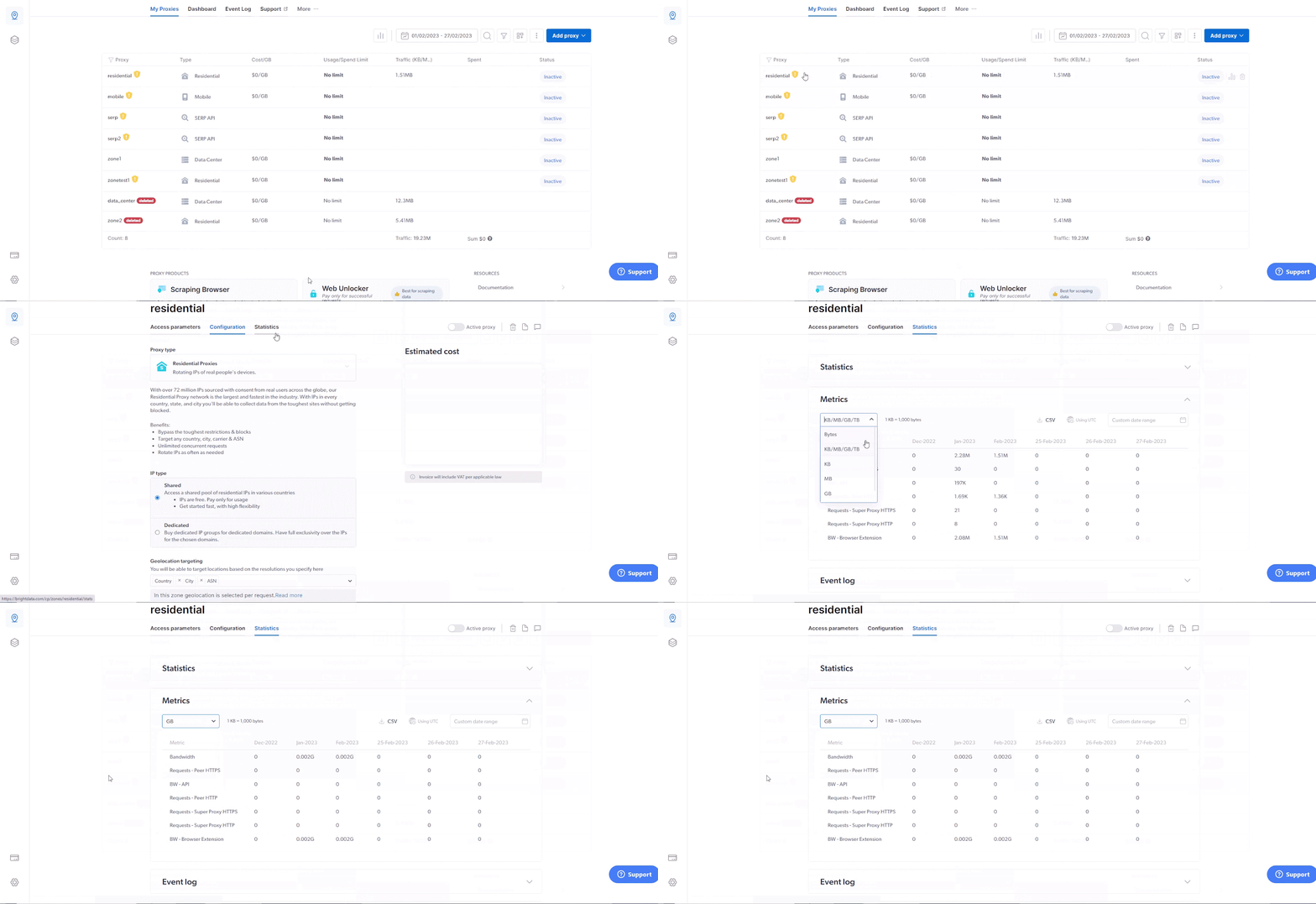
To review your current bandwidth consumption, simply browse to your [residential zone](https://brightdata.com/cp/zones), click on ‘Statistics’ in the top menu, in the ‘Metrics’ section, open the drop-down menu, and change the metric to ‘GB’.
 ## How Traffic Is Measured
Your usage of the residential proxy network is calculated via **bandwidth** consumption. Bandwidth is the amount of information that is sent over a connection and is being downloaded. Each request you send with your proxy consumes a certain amount of bandwidth. Your billing is calculated via \$ per # of bandwidth used.
See our [Billing & Pricing](/general/account/billing-and-pricing) page to learn more.
## How Traffic Is Measured
Your usage of the residential proxy network is calculated via **bandwidth** consumption. Bandwidth is the amount of information that is sent over a connection and is being downloaded. Each request you send with your proxy consumes a certain amount of bandwidth. Your billing is calculated via \$ per # of bandwidth used.
See our [Billing & Pricing](/general/account/billing-and-pricing) page to learn more.