> ## Documentation Index
> Fetch the complete documentation index at: https://brightdata-ipv6-release.mintlify.site/llms.txt
> Use this file to discover all available pages before exploring further.
# How to Use Bright Data on iOS
> Learn how to set up Bright Data proxies on your iOS to enjoy secure, private, and unrestricted browsing. This guide walks you through the entire configuration process, ensuring a smooth and reliable connection.
### Your proxy access information
Bright Data proxies are grouped in "Proxy zones". Each zone holds the configuration for the proxies it holds.
To get access to the proxy zone:
1. Login to Bright Data control panel
2. Select the proxy zone or setup a new one
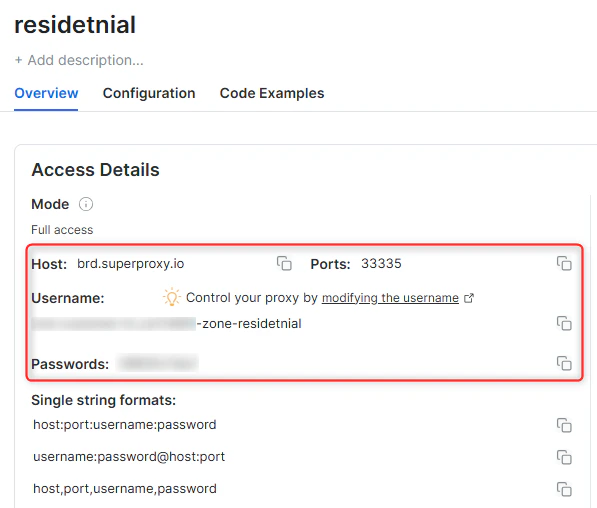
3. Click on the new zone name, and select the **Overview** tab.
4. In the overview tab, under **Access details** you can find the proxy access details, and copy them to clipboard on click.
5. You will need: Proxy Host, Proxy Port, Proxy Zone username and Proxy Zone password.
6. Click on the copy icons to copy the text to your clipboard and paste in your tool's proxy configuration.
### Access Details Section Example
 ### Residential proxy access
To access Bright Data's **Residential Proxies** you will need to either get verified by our compliance team, or install a certificate. [Read more...](https://docs.brightdata.com/proxy-networks/residential/network-access)
### Targeting search engines?
If you target a search engine like google, bing or yandex, you need a special Search Engine Results Page (**SERP**) proxy API. Use Bright Data SERP API to target search engines.
[Click here to read more about Bright Data SERP proxy API.](https://docs.brightdata.com/scraping-automation/serp-api/introduction)
### Correct setup of proxy test to avoid "PROXY ERROR"
In many tools you will see a "test proxy" function, which performs a conncectivity test to your proxy, and some add a geolocation test as well, to identify the location of the proxy.
To correctly test your proxy you should target those search queries to:
`https://geo.brdtest.com/welcome.txt` .
Some tools use popular search engines (like google.com) as a default test target. Bright Data will block those requests and you tool will show **proxy error** although your proxy is perfectly fine.
If your proxy test fails, this is probably the reason. Make sure that your test domain is not a search engine (this is done in the tool configuration, and not controlled by Bright Data).
## Why Use Bright Data on iOS?
Setting up Bright Data proxies on your iOS helps you:
* **Protect Your Privacy**: Hide your real IP address and browse more securely.
* **Access Geo-Restricted Content**: Connect through various regions to access content available in different countries.
* **Improve Reliability**: Reduce detection risks and enjoy stable, anonymous connections while you browse, shop, or manage accounts from your phone.
## Prerequisites
Before you get started, make sure you have:
1. **Bright Data Proxy Credentials**:
* Log in to your [Bright Data dashboard](https://brightdata.com/cp/zones) and find your Host, Port, Username, and Password.
2. **An iPhone running iOS 10 or later**:
* The steps below work with most recent iOS versions.
## Configuring a Proxy for a Wi-Fi Network
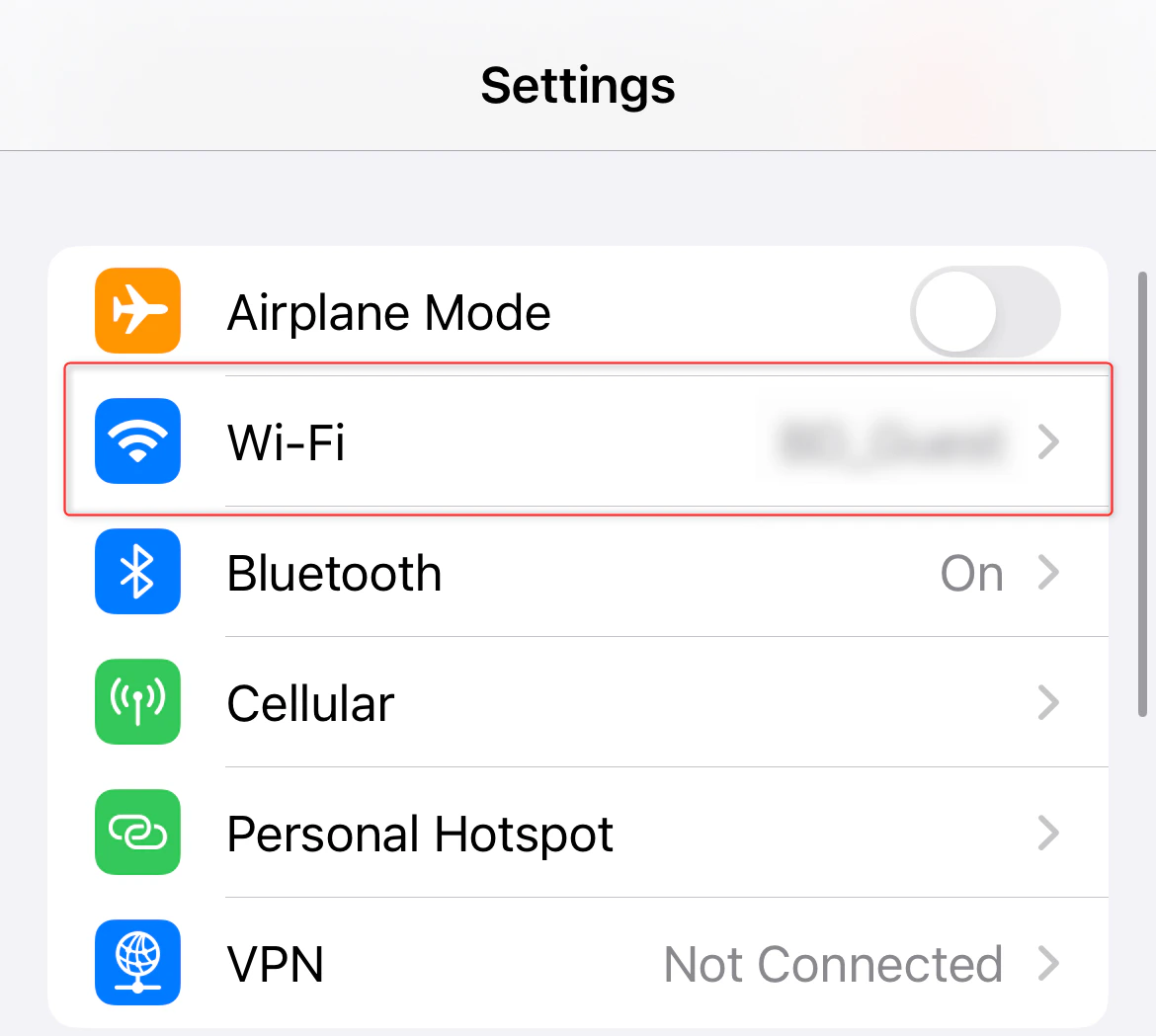
1. Go to **Settings** on your iPhone’s home screen.
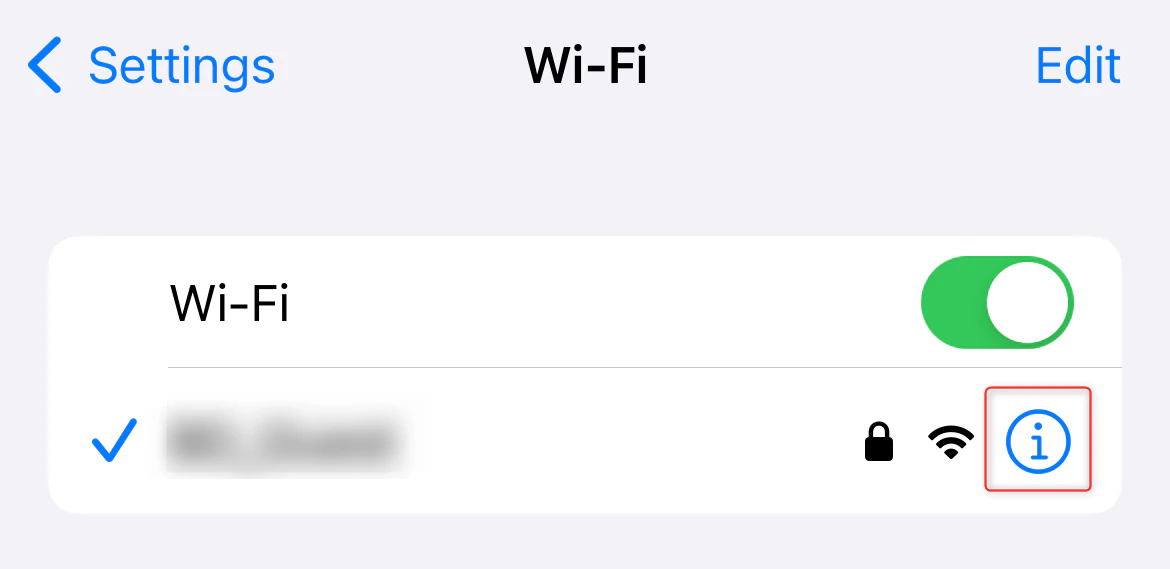
2. Tap **Wi-Fi**, then select the **i** (info) icon next to the network you’re connected to.
### Residential proxy access
To access Bright Data's **Residential Proxies** you will need to either get verified by our compliance team, or install a certificate. [Read more...](https://docs.brightdata.com/proxy-networks/residential/network-access)
### Targeting search engines?
If you target a search engine like google, bing or yandex, you need a special Search Engine Results Page (**SERP**) proxy API. Use Bright Data SERP API to target search engines.
[Click here to read more about Bright Data SERP proxy API.](https://docs.brightdata.com/scraping-automation/serp-api/introduction)
### Correct setup of proxy test to avoid "PROXY ERROR"
In many tools you will see a "test proxy" function, which performs a conncectivity test to your proxy, and some add a geolocation test as well, to identify the location of the proxy.
To correctly test your proxy you should target those search queries to:
`https://geo.brdtest.com/welcome.txt` .
Some tools use popular search engines (like google.com) as a default test target. Bright Data will block those requests and you tool will show **proxy error** although your proxy is perfectly fine.
If your proxy test fails, this is probably the reason. Make sure that your test domain is not a search engine (this is done in the tool configuration, and not controlled by Bright Data).
## Why Use Bright Data on iOS?
Setting up Bright Data proxies on your iOS helps you:
* **Protect Your Privacy**: Hide your real IP address and browse more securely.
* **Access Geo-Restricted Content**: Connect through various regions to access content available in different countries.
* **Improve Reliability**: Reduce detection risks and enjoy stable, anonymous connections while you browse, shop, or manage accounts from your phone.
## Prerequisites
Before you get started, make sure you have:
1. **Bright Data Proxy Credentials**:
* Log in to your [Bright Data dashboard](https://brightdata.com/cp/zones) and find your Host, Port, Username, and Password.
2. **An iPhone running iOS 10 or later**:
* The steps below work with most recent iOS versions.
## Configuring a Proxy for a Wi-Fi Network
1. Go to **Settings** on your iPhone’s home screen.
2. Tap **Wi-Fi**, then select the **i** (info) icon next to the network you’re connected to.
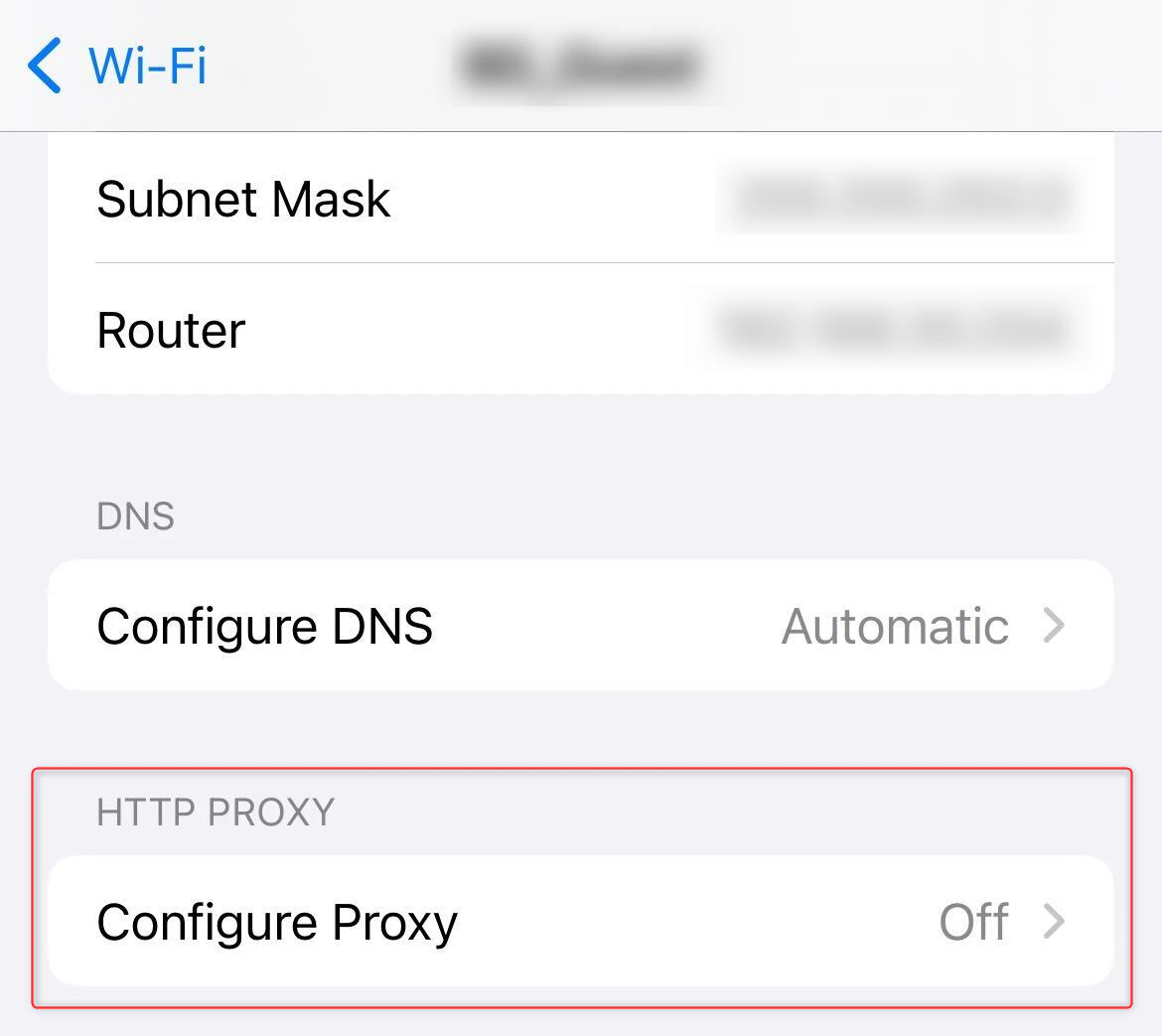
 1. Scroll down until you see **HTTP Proxy**.
2. Switch from **Off** or **Auto** to **Manual**.
3. Toggle **Authentication** *On*.
1. Scroll down until you see **HTTP Proxy**.
2. Switch from **Off** or **Auto** to **Manual**.
3. Toggle **Authentication** *On*.
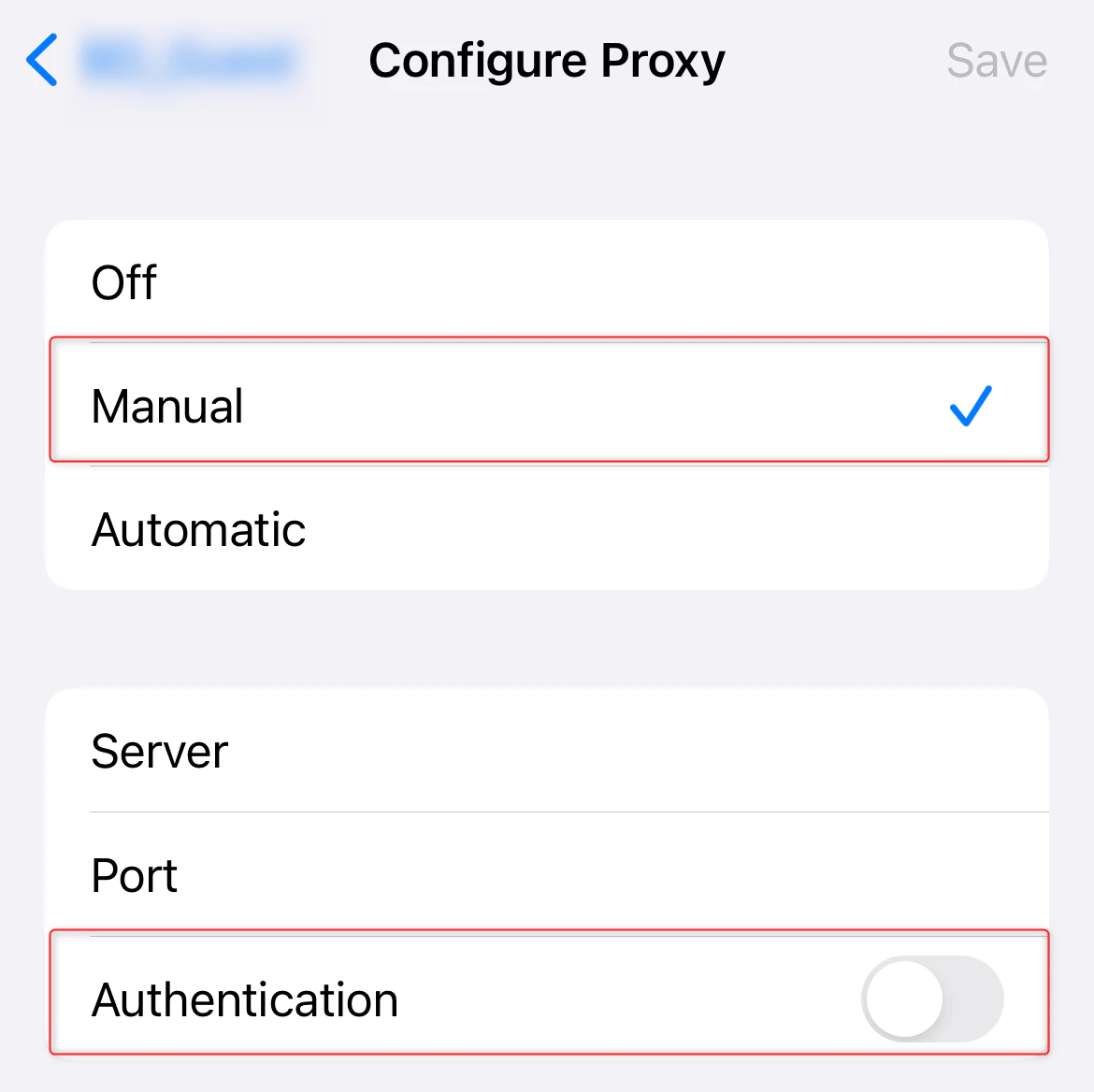 1. **Server**: Enter `http://brd.superproxy.io/` (or your given Host).
2. **Port**: Use the port number from your [Bright Data dashboard](https://brightdata.com/cp/zones).
3. **Username** and **Password**: Provide the Bright Data login details.
4. Make sure everything is accurate.
5. Tap **Save** to confirm your settings.
1. Open **Safari** and go to [httpbin.org/ip](http://httpbin.org/ip).
2. Check if the displayed IP matches the Bright Data proxy IP. If it does, your Wi-Fi traffic is now secure and private.
With **Bright Data** integrated into your **iOS device** browsing experience, you’re now better equipped to access geo-restricted content, protect your identity, and ensure a more secure, private connection—no matter where you are. Enjoy the freedom and peace of mind that come with Bright Data’s reliable, anonymous proxies!
1. **Server**: Enter `http://brd.superproxy.io/` (or your given Host).
2. **Port**: Use the port number from your [Bright Data dashboard](https://brightdata.com/cp/zones).
3. **Username** and **Password**: Provide the Bright Data login details.
4. Make sure everything is accurate.
5. Tap **Save** to confirm your settings.
1. Open **Safari** and go to [httpbin.org/ip](http://httpbin.org/ip).
2. Check if the displayed IP matches the Bright Data proxy IP. If it does, your Wi-Fi traffic is now secure and private.
With **Bright Data** integrated into your **iOS device** browsing experience, you’re now better equipped to access geo-restricted content, protect your identity, and ensure a more secure, private connection—no matter where you are. Enjoy the freedom and peace of mind that come with Bright Data’s reliable, anonymous proxies!