Find answers to common questions about integrating, configuring, and using Bright Data’s proxy products, including IP types, geotargeting, and error codes.
Use this file to discover all available pages before exploring further.
What exactly is a zone and how important is the zone name?
In bright data, a “zone” represents a specific product and its configuration settings. You can think of it as an instance in the context of cloud computing.For example, you can have a zone for Datacenter proxy in Germany and you can have a separate zone for Datacenter proxies in France.Every zone has a name and one or more password, allowing you to interact with it.The zone name itself cannot be changed once it’s configured, so you may want to use an easy to remember name that represents what you’re trying to achieve. Keep in mind, that you can add a 描述 to the zone, and you can change that 描述 anytime. You can find it under the zone name at the top of the page.The zone name is used to create your proxy username, which you can then customise if you want in order to control your proxies. Here is a sample proxy username for proxies in the USA - as you can see it includes the zone name inside it:brd-customer-<customer_id>-zone-<zone_name>-country-usAs mentioned, you cannot change the name of the zone after you have saved it - if you want to change the name, simply create a new with a new name.
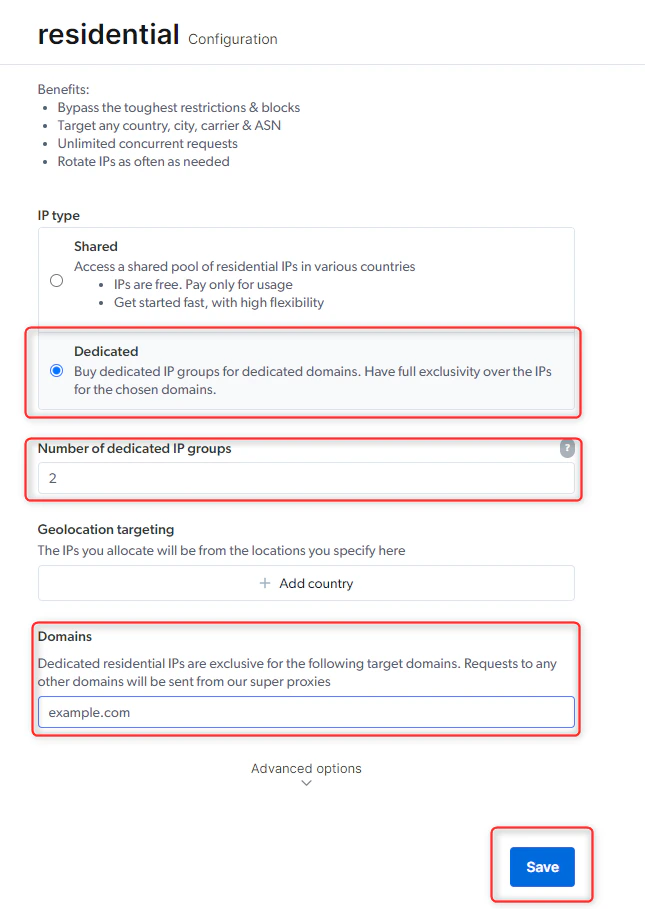
IPs that are set aside for your use only. Since Bright Data’s residential network is an opt-in, residential network made up of millions of devices around the world, Bright Data developed the group IPs (gIPs) method to further enhance your dedicated IP capability.
gIP contains between 6-90 IPs at any given moment while sharing the same attributes, targeting the selected dedicated domains within the zone “Configuration” section.
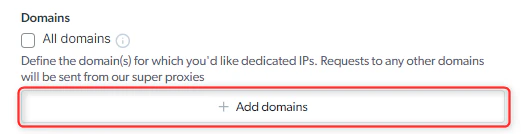
Define the domains you’d like your IPs to be exclusive to. 请求 to any other domain will be bypassed and sent from our servers .\
There is no option to add “All domains”. 请求 to domains that are not in the list will be sent from the our servers resulting in a super-proxy bypass and will be either blocked or rerouted through a different proxy.
When you send your request, it will originate from the country you’ve selected within your zone configuration. There is **no need to add additional country flags.**For example, if you’ve configured your ‘地理位置定位’ country to be the United States (‘us’), you may send your request with the following default syntax and we will automatically route it through whatever is set in your proxy’s configuration:
Super-proxies are the gateway servers of Bright Data. Every request sent through Bright Data’s proxy platform passes through these servers, which select the best peer based on the request details and balance the load among peers.In some cases, Bright Data may not be able to process your request via a peer, resulting in a super-proxy bypass. This means the request is sent directly from Bright Data’s gateway servers instead of a peer.When a super-proxy bypass occurs, the response headers will include an info message explaining why it happened.It is possible to block requests from being sent from the super-proxies when it happens, simply add the -route_err-block flag to your proxy username:
Connects you to a pool of 40,000 IPs that consist of a fixed allocated range of IPs from every country available.
这些IP可以根据需要在含有2万个IP的池中不断轮换(可以在Chrome、Proxy Manager或通过API选择特定国家)
地理位置定位 - With a ‘共享IP’ IP (pay-per-usage), you’ll be able to control your geolocation targeting when you send a request, with the -country flag. 以美国为目标的简单请求示例如下
Purchase individual IPs for your use (with unlimited BW or cost per GB) in the country of your choosing. You will be charged per IP and usage, or switch to unlimited bandwidth.
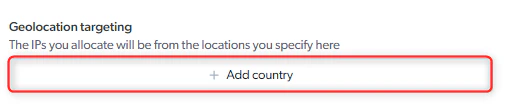
地理位置定位 - The IP allocated to your zone will be from the selected country.
For geolocation, if you choose an IP type where your IPs are automatically allocated (按IP付费 or 专用IP), it is recommended to set up a separate ISP proxy zone, for each geolocation you wish to target.
专用IP IPs are set aside for your use only. This IP type is more lucrative and you can control the allocation of the IPs based on the following features:
地理位置定位 - With a ‘共享IP’ IP (pay-per-usage), you’ll be able to control your geolocation targeting when you send a request, with the -country flag. 以美国为目标的简单请求示例如下
Purchase individual IPs for your use (with unlimited BW or cost per GB) in the country of your choosing. You will be charged per IP and usage, or switch to unlimited bandwidth.
地理位置定位 - The IP allocated to your zone will be from the selected country.
For geolocation, if you choose an IP type where your IPs are automatically allocated (按IP付费 or 专用IP), it is recommended to set up a separate ISP proxy zone, for each geolocation you wish to target.
专用IP IPs are set aside for your use only. This IP type is more lucrative and you can control the allocation of the IPs based on the following features:
地理位置定位 - The dedicated IP allocated to your zone will be from your selected country
Domains - Define the domains you’d like your IPs to be exclusive to. 请求 to all other domains will be sent from our super proxies.
You may check ‘All domains’ for full exclusivity over the IPs, and in this case, they will only be used by you.
How to my allocated IPs?
You can find your IP list in the following pages:
Zone overview page: There are ‘Download’ and ‘View’ buttons below the code example.
Main zone table: There are ‘Download’ and ‘View’ icons under the ‘Allocated IPs’ column.
In both cases the buttons will do the same thing:
The view button will allow you to view, refresh and remove IPs from the pool.
The download button will download a csv file with the full list in
host:port:username:password format.
如何将新代理集成到代码中?
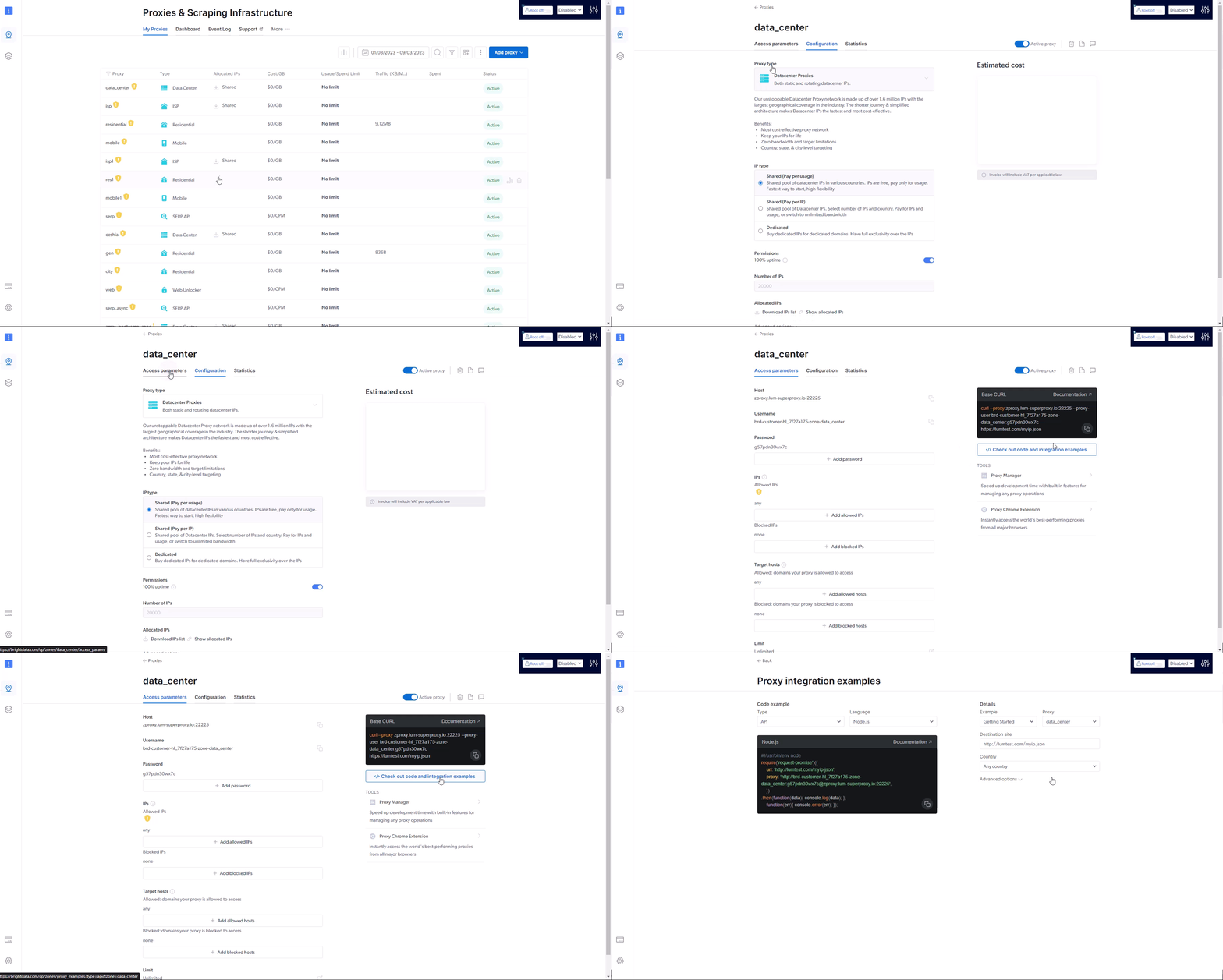
To integrate the proxies into your code, please visit the API examples page, which can be accessed via your zone’s settings:\在该页面上,您可以选择大多数现代编码语言的集成示例,只需选择集成类型、代理区域、编码语言等,该页面就会生成可以立即使用的代码片段。
How can I test if my proxy is working?
To test your proxy, use the terminal command that’s available in your Overview tab for the proxy.Copy and paste it to your terminal. In Windows, click the ‘Start’ button and enter ‘cmd’. In Mac or Linux, run the ‘terminal’ application. Then, paste the code in the new window.If your proxy is working well, you will see text on the console with details regarding your proxy.If not, you will see an error code. You can always paste the error code in the AI agent integrated into the dashboard to get additional details.
如何将代理集成到第三方软件中?
Check out a few examples in the API examples page mentioned above (just choose “other software” in the “language” drop-down menu), or check our Integrations page, where we have specific guides to integrate our proxies within the most popular tools across the industry today.Important note: If you are using Bright Data’s Web Unlocker, 住宅 Proxies or the SERP API you probably need to use our SSL certificate to enable end-to-end secure connections. See instructions here.
How do I configure proxy in a specific country?
You can control the location of your country easily for every request that you send. You can choose proxies by country, state, city, zip code and ASN. In this answer, we will focus on choosing a specific country.When sending your request, you can make you Proxy appear to be in a in a specific country by adding the -country flag, after your zone’s name in the request, followed by the 2-letter ISO code for that country.If you use a third-party tool or application, simply use the username that includes the country-xx in the configuration. In other words, in the box where you need to put in the proxy username, enter the full string, including the country parameter, for example: brd-customer-<customer_id>-zone-<zone_name>-country-us - don’t forget to use your own credentials that you can find in the “Overview” tab.If you use your own code, see the example below: We added -country-us to our request, so we will send a request originating from the United States (“us”).
If you use a third-party application in conjunction with the proxies, you can enter the username, including the country to software’s configuration.Of course, if you send requests to the proxy using code that you wrote, you can easily adjust the username to target specific countries as needed.Remember, you can also choose proxies by country, state, city, zip code and ASN. See this guide for more info.
How can I set default countries for zones with fixed IP pools?
Some zones will give you access to a big fixed pool of IPs from all around the world. In these zones, you may select default countries to target without specifying the country in the request.After selecting the default countries, the zone will target one of these countries in each request. You can still target other countries by adding the -country-xx flag to your request and override the default country selection.
Why can't I find a country in the list?
Bright data has Datacenter and ISP proxies in most countries around the world, but not all. We are constantly adding data centres in new countries as they become available.If you cannot find the country you are looking for in Datacenter or ISP proxies, we recommend you check out 住宅 proxies. Since residential proxies are based on real people with real devices, we are able to offer residential proxies in every country in the world!
如何以欧盟地区为目标
欧盟国家的分配是随机的。
适用于数据中心、ISP和Web Unlocker/SERP API
You can target the entire European Union region (member countries) in the same manner as “Country” above by adding “eu” after “country” in your request: -country-eu请求 sent using -country-eu, will use IPs from a single, randomally selected country of the countries below which are included automatically within “eu”:Member countries are:
Austria, Belgium, Bulgaria, Croatia, Republic of Cyprus, Czech Republic, Denmark, Estonia, Finland, France, Germany, Greece, Hungary, Ireland, Italy, Latvia, Lithuania, Luxembourg, Malta, Netherlands, Poland, Portugal, Romania, Slovakia, Slovenia, Spain, Sweden
How to target all countries except China?
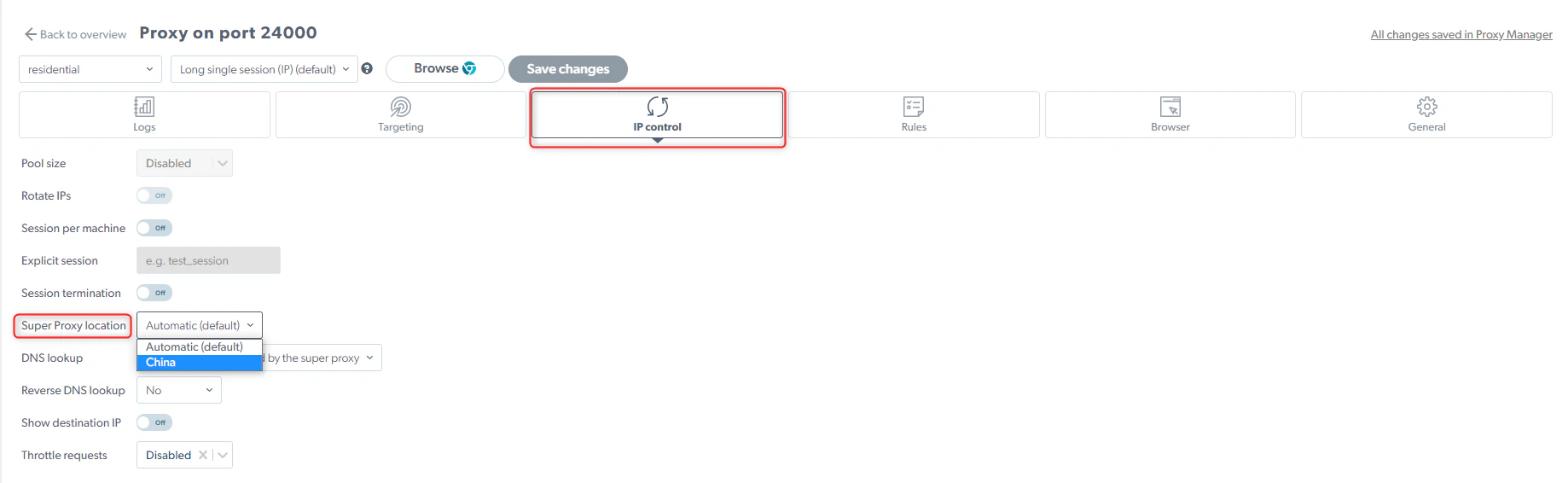
When Allocating IPs to a Zone, in the country selection section in the configuration UI, you can select the ‘All except CN’ option, which allows you to allocate IPs from all around the world while excluding IPs from China.Note this option is available only in the following zone types:
数据中心 / ISP - 共享IP - Pay per proxy
数据中心 / ISP - 专用IP
如何以特定城市为目标?
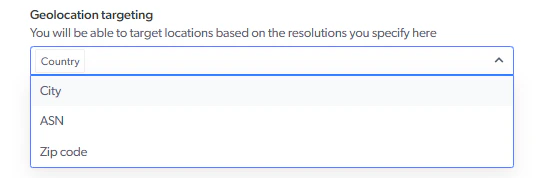
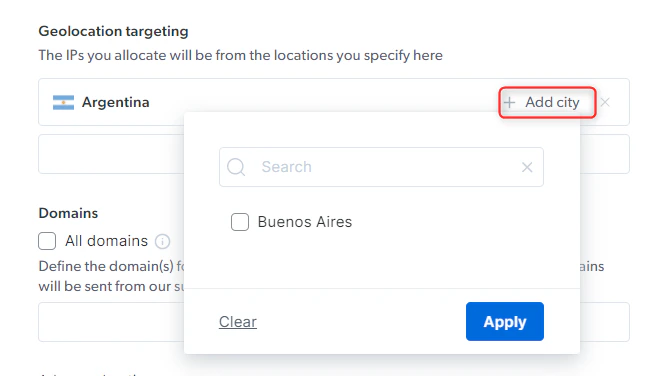
In order to target a specific city you will need to use a 共享IP (pay-per-IP) or 专用IP proxy network.配置代理区域时,选择首选国家/地区后,您可以添加城市,以进一步指定您的地理定位Once you click on ‘Add city’ you will be displayed the available cities to target, for the selected country.Once configured, you’ll be able to send requests from the selected city, using the following syntax
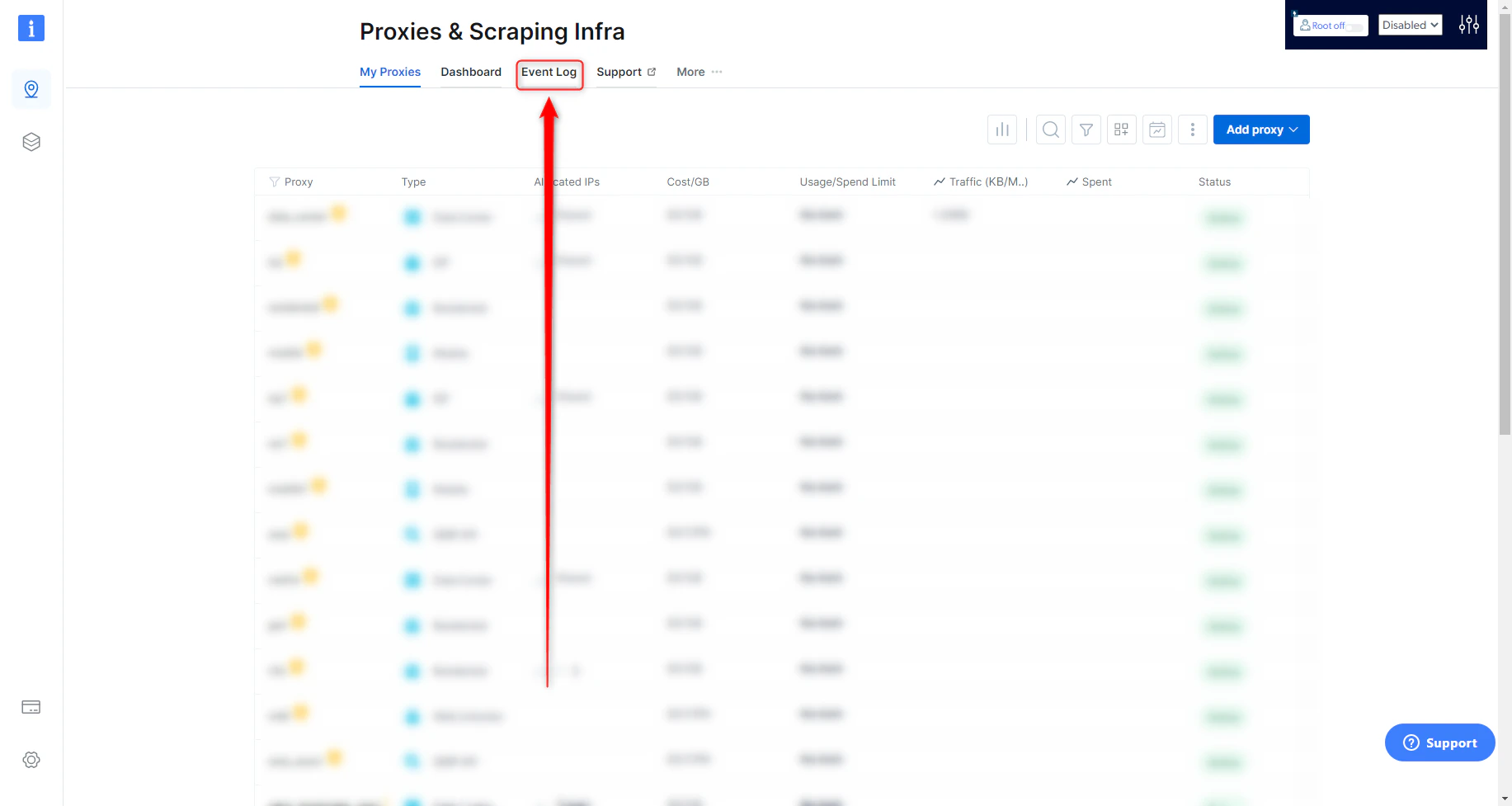
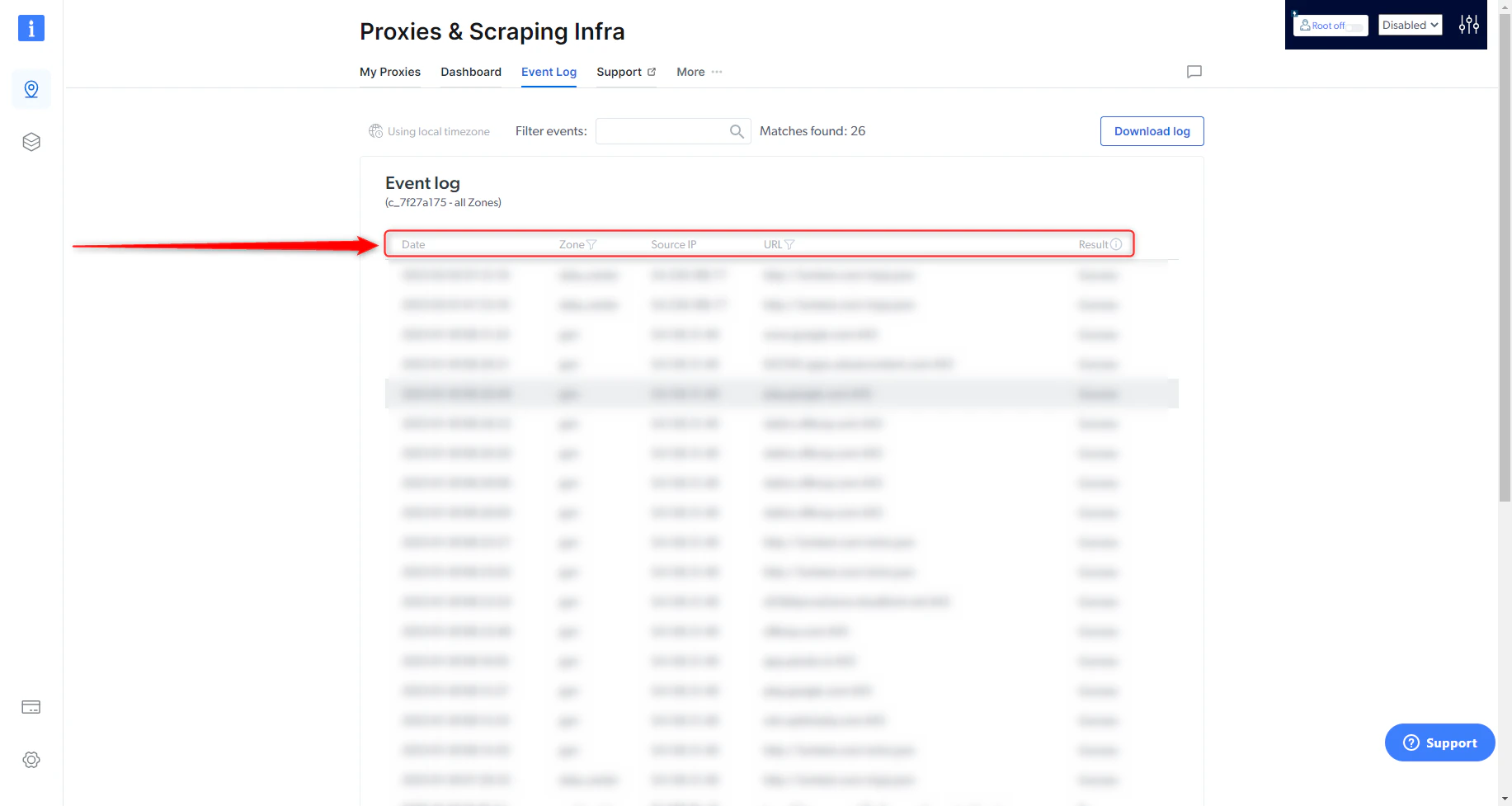
事件日志将显示您账户中的最近200个(最多)请求(任何区域)。In your Bright Data control panel’s proxies page: https://brightdata.com/cp/zonesGo to the “Event Log” tab:展示的数据包括:
Date: Time and date of the request
Zone: What Zone was used for the request
Source IP: What IP the request was made from
URL: The target site of the request
Result: Success or Fail of the request
如何启用自动IP回退?(100%正常运行时间)
Applicable for Datacenter & ISP
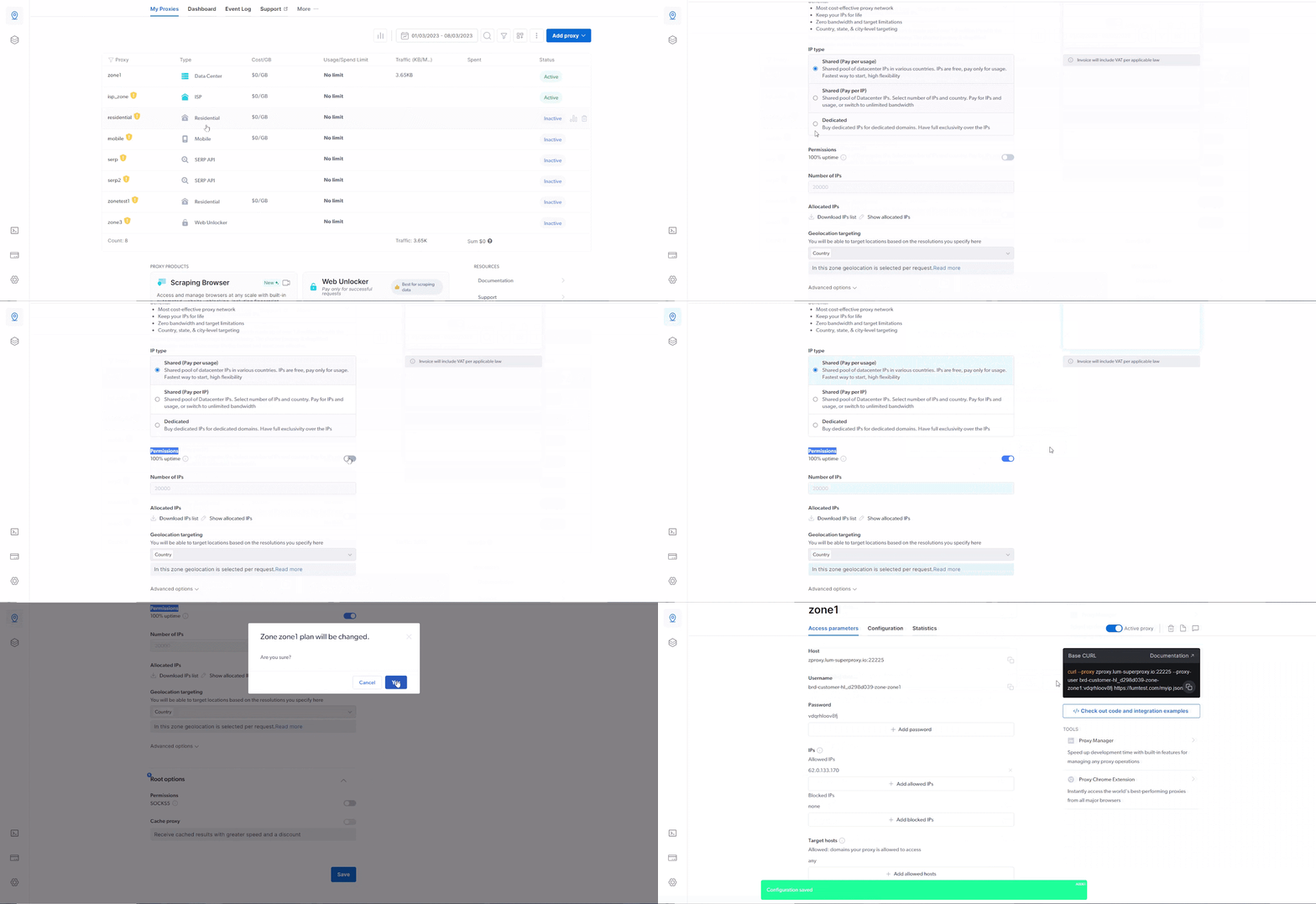
The 100% uptime was built to prevent any ‘external’ events from affecting the user. 此功能的原理非常简单,与上述两个问题的运作方式相同──如果我们的系统检测到问题(例如连接问题或IP的地理位置与您购买时的要求不符),我们会自动将您的请求路由到与原始IP完全相同的其他IP。同时,我们希望确保必须使用特定IP的客户不会受到影响,因此我们设置了一些例外:
如果您的请求中指定了特定的IP,我们不会为其分配回退IP。
100%正常运行时间不会断开实时连接。 如果需要回退,回退将在下一个连接建立后启动
The 100% uptime brings immediate value by providing 100% connectivity and continuous high-performance level, free of charge and without having to make any changes in your code or how you work.
100% uptime feature can be turned on or off, via API.
如何启用代理自动故障转移功能?
Navigate to your proxy configuration settings, and under Advanced settings enable ‘100% uptime’
If an assigned Proxy Peer(exit node IP) becomes unavailable, the Super Proxy will return an error “502 - No peers available” for the first request and then on the second request the super proxy will assign a new peer even if you do not change the session ID.
会话IP最多可在1分钟的闲置时间内保持不变。 一分钟后,如果仍没有请求,IP将被释放回池中。
To keep this Session/IP for longer, send a tiny keep-alive request every 30 seconds, to prevent this session from becoming idle for over a minute.
This request may be anything small, such as /favicon.ico, or even a request that returns 404 (as long as the web server does not disconnect the socket due to this request).
If you have multiple Clients and would like to ignore your Clients source IP (which is used together with your session ID to create a session), then you want to use a global session then add glob_ as a prefix to your session:
Generate the random number on thread startup, and change it when you want to change the Proxy Peer assigned for the thread’s connection.
Where do I find is my proxy address and port?
You can find your proxy address and port in the “Overview” tab inside the proxies that you configured.To do this, click on my zones, then click the line with the proxy you need.On the overview tab you can also copy your proxy list, download it, refresh your proxies etc.
如何将IP和域名列入白名单/黑名单?
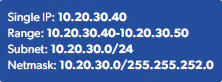
Whitelisting your IP is a good way to keep your account secure, as it prevents others from accessing your proxy even if they have your username and password.When you whitelist an IP, only that IP will be allowed to send requests to your proxies. Note that any IP can connect to the configuration dashboard itself.Remember, the fact that you whitelist an IP does not mean you can access your Bright data product from that IP without your username and password. You always need to use your username and password when accessing your Bright data product.To add IPs to a zone’s blacklist/whitelist, there are 2 ways:
通过控制面板:
Go to any of your zone’s settings, and click the “Configuration” tab.
Scroll down to the “Security settings” section, as they are both responsible for white/blacklisting IPs and domains, respectively:
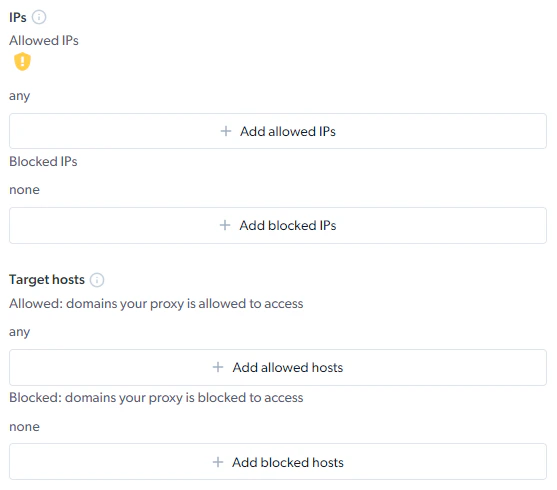
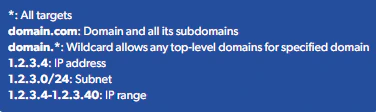
Add all the relevant IPs and domains you’ll allow access to with your proxy zone.
IPs that should be whitelisted are your machine’s IPs that you’ll be sending requests with, not the proxy IPs in your zones.
We strongly recommend whitelisting your IPs wherever possible, since when the whitelist is empty, you run the risk of getting your non-whitelisted IPs temporarily blocked in the case where our automatic security blocking system detects any irregular activity. See more info within this video.
There is no limit on how many IPs/domains you can add to the whitelist and we also support ranges of IPs.
Bright data supports SOCKS5 protocol, with a default port 22228 assigned for SOCKS5 communication.SOCKS5 is supported for Datacenter and ISP networks.See here for full SOCKS5 configuration instructionsNote: If you need to use SOCKS5 on the 住宅 proxy network, please obtain approval by our compliance department. Compliance approval is not needed for Datacenter and ISP networks.
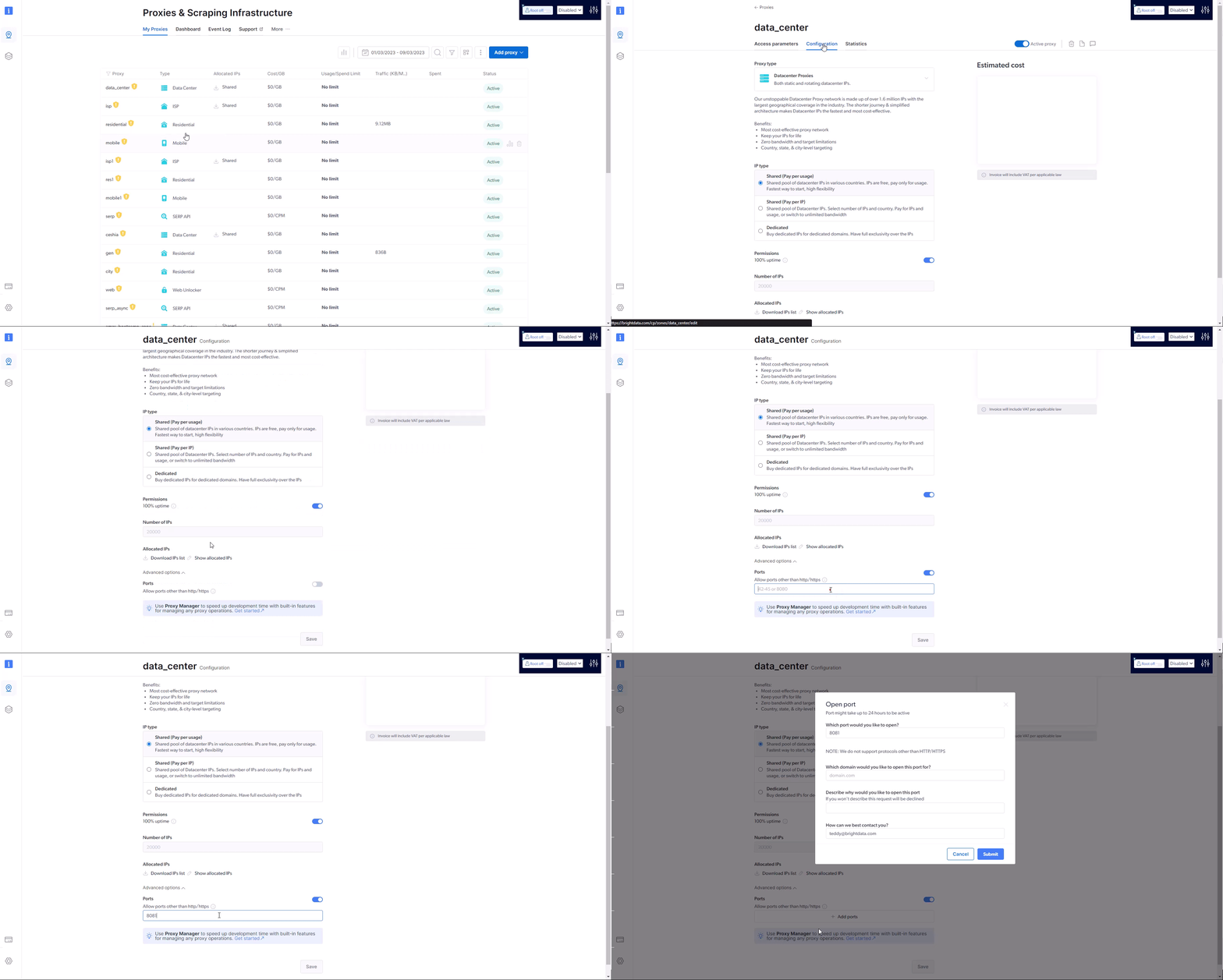
默认情况下,所有区域都提供端口80和443,可用于HTTP和HTTPS协议。在数据中心或ISP类型的代理区域中,默认支持所有高于1024的端口。在住宅或移动类型的代理区域中,默认可用的端口为:8080、8443、5678、1962、2000、4443、4433、4430、44444和1969。Bright Data可以应要求支持其他端口。 Bright Data合规团队将会为每个要求支持新端口的请求启动专属的额外合规流程。
示例s of ports that require Bright Data compliance review before activation:要请求向您的区域添加端口权限,请按照以下步骤操作:
Go to your zone’s settings (it will open on the “configuration” tab by default, if not, please click it)
Scroll down to “advanced options” and click it
Enable “ports”
输入您想获得批准的端口号
填写表格,等待我们的合规团队与您联系并批准请求
如何针对特定的操作系统?
Bright Data allows targeting the following Operating Systems:
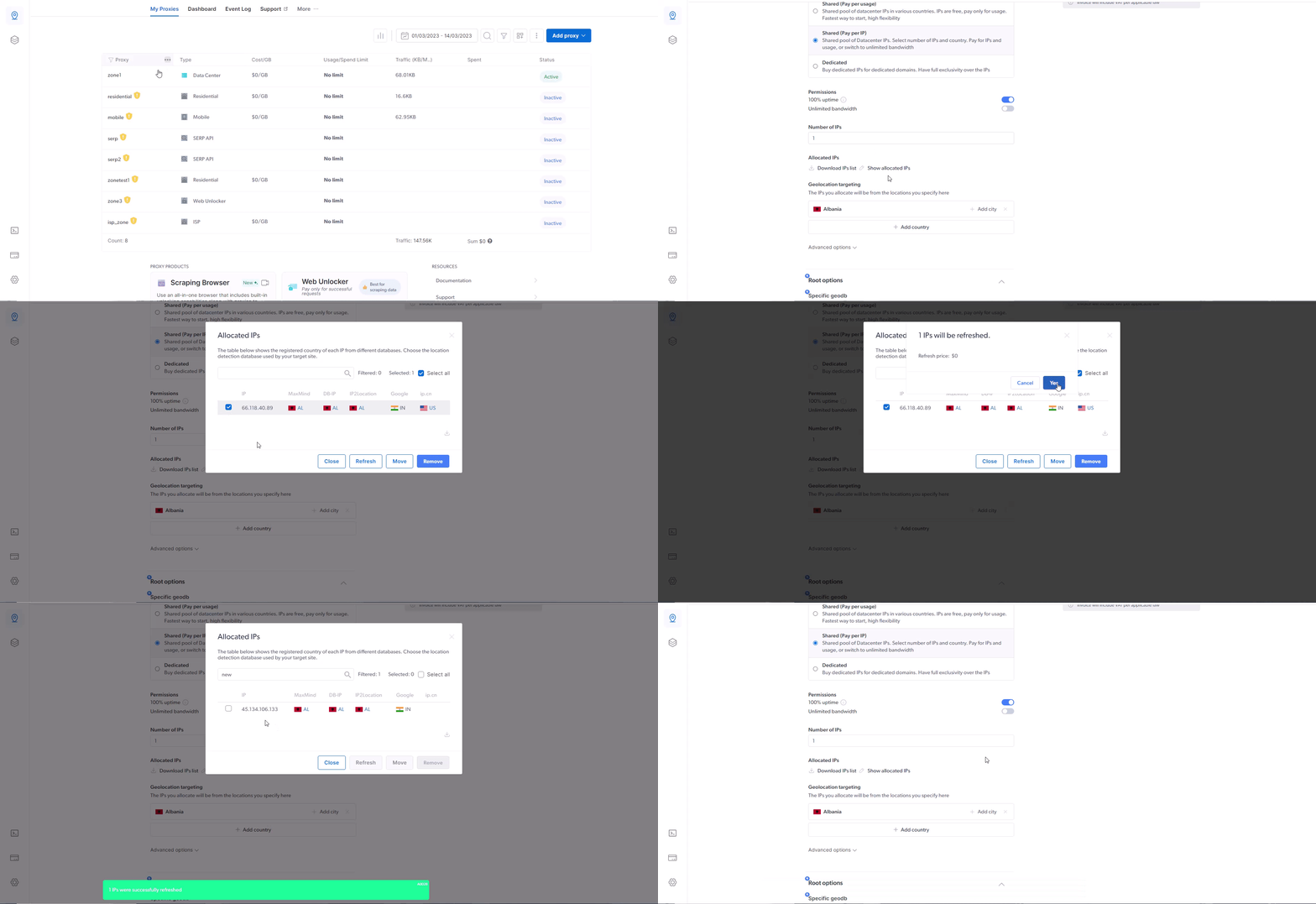
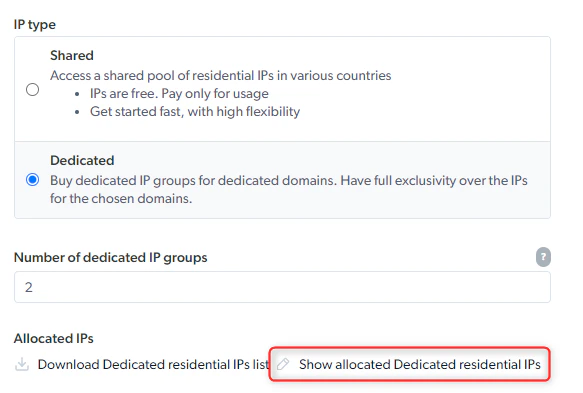
If you’ve selected ‘按IP付费’ shared, or a dedicated IP type in your zone configuration, you’ll be allocated a fixed IP address. 您可能需要不时刷新这些IP地址,这取决于您的使用情况。In order to refresh IPs allocated to your zone, navigate to your selected zone, under ‘Allocated IPs’ click on ‘Show allocated IPs’, check the box of the IP or gIP you wish to refresh and click ‘Refresh’
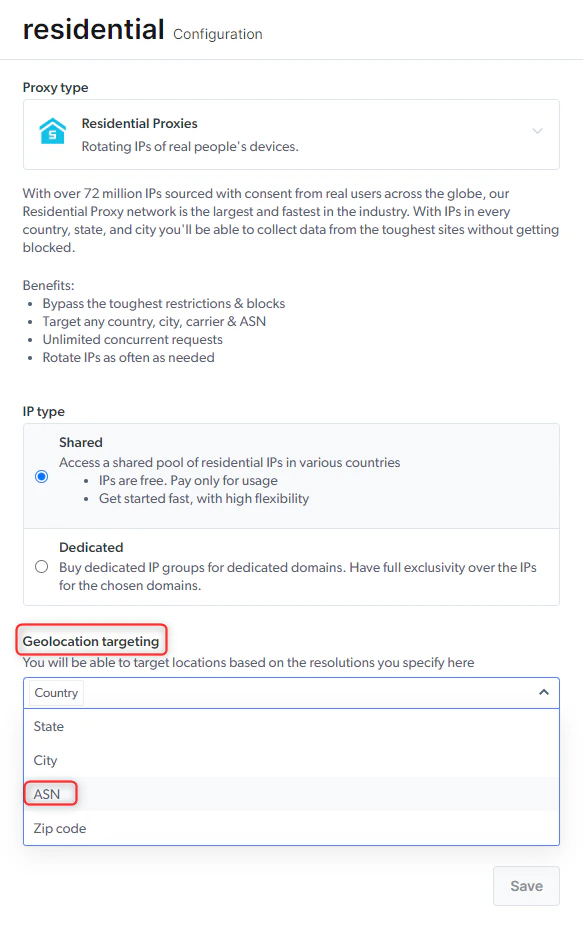
This feature can be enabled by adding the ASN parameter to your Zone configuration, under Geolocation Targeting.Once the configuration is saved, the ASN flag can be added to the Zone’s credentials
and be integrated when using the 住宅 proxies. 例如:
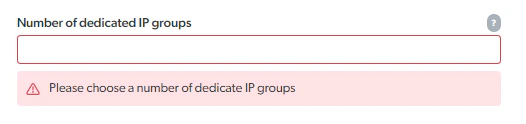
专用IP 住宅 IPs can be selected in the form of gIPs. They can be allocated under the zone’s configuration page by selecting a “专用IP” IP type and choosing a number of gips. 此外,还需要针对特定域名。Once the configuration is saved, selecting “Show allocated 专用IP residential IPs” will provide
a list of hash values that represent group IPs.\这些值可用于针对特定的 gip。 例如:
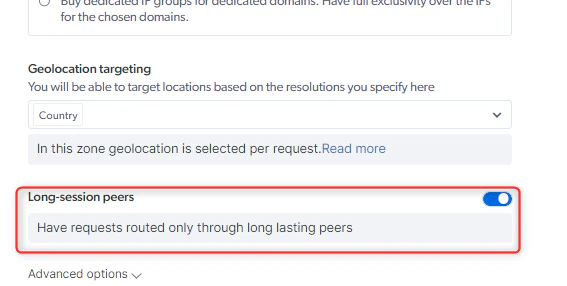
长会话对等点让您能够在一段长时间内保持稳定的IP地址,以确保抓取操作顺畅和一致。 如果普通住宅IP的对等点意外断开连接,IP可以随时轮换,长会话对等点则不同,能提供连续会话。启用长会话对等点只需进入一个现有的住宅区域或创建一个新的住宅区域,然后打开“长会话对等点”功能即可。 现在,您今后的请求仅会通过已知的长期对等点进行路由。 Note: This feature does add an extra cost for the zone when enabled这些对等点来自哪里?Our 住宅 peers’ pool consists of real users around the world who opt-in to use our product. As part of the opt-in, we utilize the IPs of these real users during their “down” periods as part of our ethical residential network. 启用长会话对等点后,您可以确保路由是通过已知能够长时间保持活跃状态的对等点进行;与普通住宅对等点相比,长会话对等点可以保持同一个IP地址更长时间。长会话对等点的优势持续的抓取操作:具有稳定性,能够最大限度地减少因IP变更而造成的中断,并最大限度地提高抓取任务的效率。 您可以在一段长时间内使用同一个IP地址,这让您可以进行长时间的抓取操作。 This feature is particularly useful for projects that require continuous data extraction or monitoring.
How to review usage stats for proxy products in the control panel
Data Usage per Network: Shows total bandwidth and number of requests for each proxy product over the selected timeframe.
Usage Overview: Displays a graph where you can select timeframe, data point (bandwidth, requests, average bandwidth per request), and filter by zone, product, or target domain. You can also compare usage between timeframes using the “Compare to” option.
In the zone ‘Overview’ section you can view stats for a specific zone, with options to compare timeframes, choose data points (bandwidth, requests, bandwidth per request), and view additional metrics in a table below the graph.
如何使用中国住宅IP浏览中国网站
When outside of China
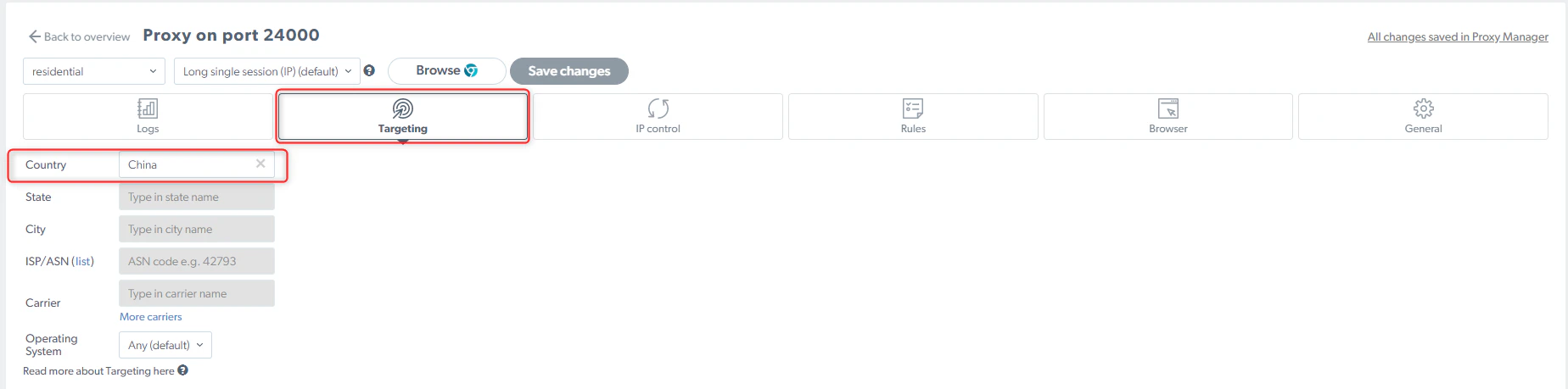
Targeting Chinese 住宅 IP peers is enough:
SERP API is the ideal product for targeting SERPs as it has a guaranteed success rate (pay only for success) with active unlocking, automatically chooses the best proxies, customizes headers, fingerprinting, solves CAPTCHAs, and more.
Scraping Browser is the ideal product as it is our fully cloud-hosted browser designed to help you easily focus on your multi-step data collection while we take care of the full proxy and unblocking infrastructure for you, including CAPTCHA solving.
我能否使用住宅、数据中心或ISP代理网络来针对Google SERP进行抓取?
住宅 Proxy - No, SERP API is the ideal product for targeting SERPs as it has a guaranteed success rate (pay only for success) with active unlocking, automatically chooses the best proxies, customizes headers, fingerprinting, solves CAPTCHAs, and more. Targeting Google SERPs from the 住宅 network will result in Super-proxy bypass, which will casue the request to be sent from our servers instead of the peer.Datacenter & ISP Proxies - No. When attempting to specifically target Google through either of these proxy networks, your request will be denied and you will receive the following error message in the response headers:
HTTP/1.1 403 搜索 engine host is not allowedX-Luminati-Error: Forbidden: This target URL isn't supported on proxy networks, use the SERP API product for targeting this URL. 您可以联系您的账户经理或开立支持工单,以寻求帮助
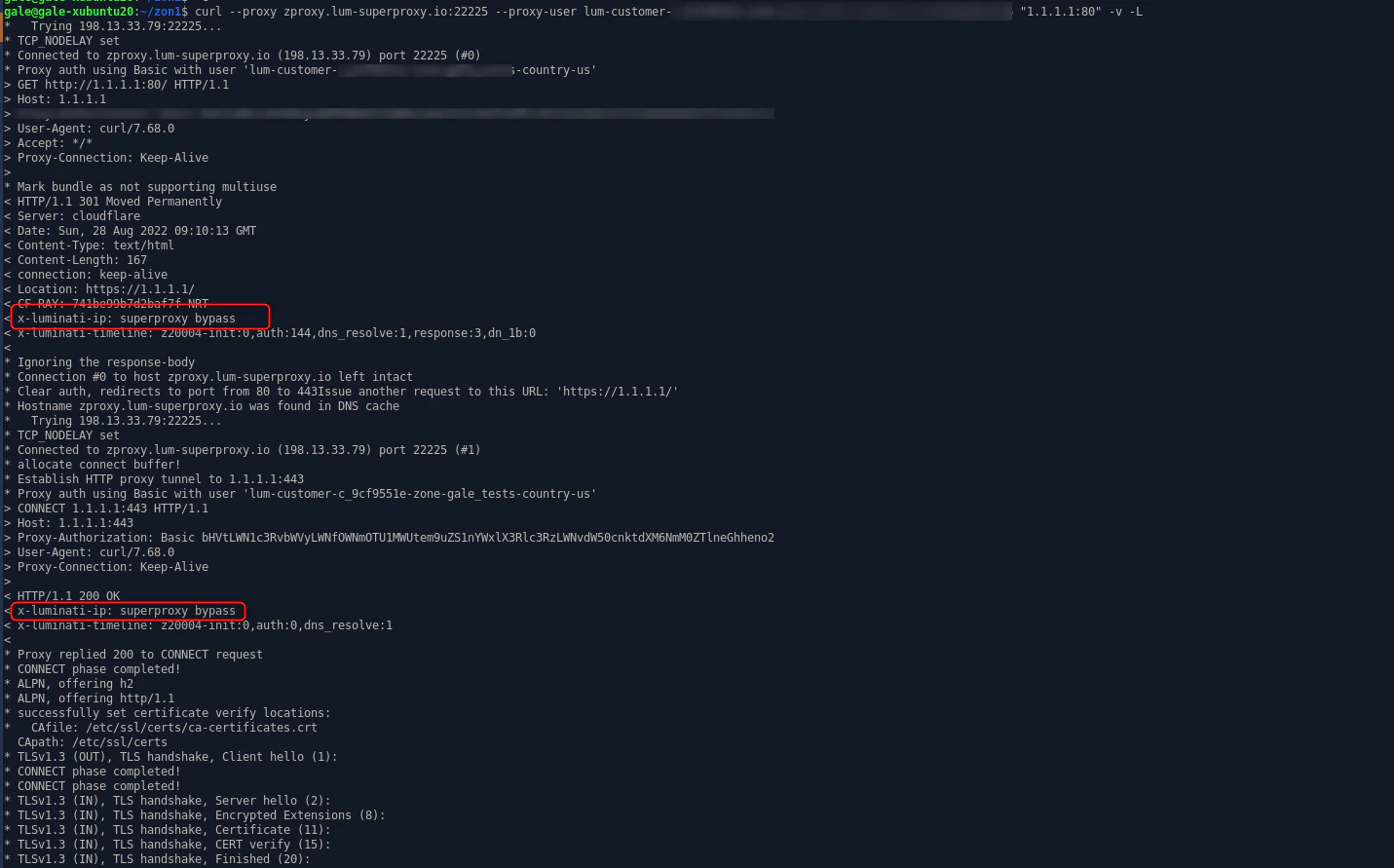
不可以──在使用Bright Data时,禁止直接向主机服务器而不是向域名发送请求。
请求 using URL format such as 1.1.1.1:443 will be executed using the super proxy server, not the proxy peer IP.使用超级代理的请求示例:
是的。 Bright data supports SOCKS5 protocol, with a default port 22228 assigned for SOCKS5 communication.See here for full SOCKS5 configuration instructions
如何控制请求的执行地点?
您可以选择直接通过超级代理执行请求,而不是通过对等点IP执行。 在这种情况下,请求的IP将是超级代理的IP。 You will need to add ‘-direct’ to your request authorization string. brd-customer-<customer_id>-zone-<zone_name>-direct
如何在不创建多个端口的情况下使用多个国家/地区的IP?
If you want to use multiple countries and you don’t want to create a separate proxy port for each country it’s also possible to control the targeting dynamically.
A residential/mobile IP are real users’ devices’ IPs, and therefore can be used only when the user’s device is idle (i.e. the device is connected to the internet, has enough battery power, and the user is not currently using it).
如果IP变得不可用,我们的系统将自动为您分配另一个相同类型和相同地理位置的可用住宅IP。
错误代码502是什么?
HTTP error code 502 means “Bad Gateway”. This error occurs when you send a request to a URL, but the URL’s server receives an invalid response from another server that it depends on to fulfill the request.可能的原因
We currently do have not matching peers for your zone’s configuration, as they might already be in use with a different client, or unavailable for other reasons.
由于没有活动,连接已超时。
主机(目标URL)端已关闭连接
错误502响应示例
Request URL: SAMPLE_URL Request method: GET ***Status code: 502*** Super proxy IP: IP Username: brd-customer-customer_id-zone-zone_name-country Password: zone_password Sent from: 127.0.0.1 Response headers connection: keep-alive date: Tue, 14 Feb 2023 08:49:16 GMT keep-alive: timeout=5 transfer-encoding: chunked x-lpm-port: 24000 x-luminati-error: waiting for selector ".price-container" failed: timeout 90000ms exceeded ***x-luminati-error-code: expect_element*** x-request-id2: REQUEST_ID Request headers user-agent: Mozilla/5.0 (Macintosh; Intel Mac OS X 10_15_7) AppleWebKit/537.36(KHTML, like Gecko) Chrome/110.0.0.0 Safari/537.36 host: SAMPLE_HOST accept-encoding: gzip, deflate Connection: keep-alive
错误代码403是什么?
HTTP 403 response code means you are forbidden from accessing a valid URL.The server understands the request, but it can’t fulfill the request because of client-side issues.可能的原因
您的机器IP未列入白名单。 In order to learn how to whitelist an IP, please review the following article.
The domain you try to access is blocked by Bright Data for compliance reasons.
您尝试访问的域未在您的用例中指定。
验证码响应失败(与Web Unlocker和SERP API相关)。
The domain you tried to access is blocked by the Target host settings of your zone (check your proxy zone’s credentials)
错误403响应示例
< HTTP/1.1 403 response status was rejected < x-debug-req-id: SAMPLE_ID < X-Luminati-Error: response status was rejected: 403 Forbidden < X-Luminati-Error-Code: http_status < Date: Wed, 22 Feb 2023 11:11:23 GMT < Connection: keep-alive < Keep-Alive: timeout=5 < Transfer-Encoding: chunked
The 403 X-luminati-error (Forbidden) indicates you are targeting a domain that is not allowed by Bright Data
This can be resolved by contacting the Bright data compliance team for approval.
As the Bright data compliance team reviews your use case and confirms - you will be informed that access is been added.
For better handling, it is advised to add your account manager to the ticket and inform him as well for your requirement 当出现以下错误消息时:
You tried to target <host> but got blocked
Appears, contact the Bright data compliance team (compliance@brightdata.com) or from the ticketing system 我们的合规团队将会审查您要求访问该特定域名的请求