

如何配置 Scraping Browser 以在特定国家/地区运行?
如何配置 Scraping Browser 以在特定国家/地区运行?
使用 Scraping Browser 时,可使用与其他 Bright Data 代理产品相同的国家定位参数。特定国家/地区设置脚本时,在 Bright Data 端点的 “USER” 凭据后添加 “-country” 标志,然后添加该国家/地区的 2 个字母的
ISO 代码。例如,对于在美国使用 Puppeteer 的 Scraping Browser:欧盟地区欧盟地区
You can target the entire European Union region in the same manner as “Country” above by adding “eu” after “country” in your request: “-country-eu”. 请求 sent using -country-eu, will use IPs from one of the countries below which are included automatically within “eu”: AL, AZ, KG, BA, UZ, BI, XK, SM, DE, AT, CH, UK, GB,IE, IM, FR, ES, NL, IT, PT, BE, AD, MT, MC, MA, LU, TN, DZ, GI, LI, SE, DK, FI, NO, AX, IS, GG, JE, EU, GL, VA, FX, FO.
Which coding languages, libraries, and webdrivers are supported by Scraping Browser?
Which coding languages, libraries, and webdrivers are supported by Scraping Browser?
Bright Data 的 Scraping Browser 支持多种编程语言和库。目前,我们使用 puppeteer、playwright 和 selenium 为 Node.js 和 Python 提供全面的本地支持,还可以使用下面的其他库集成其他语言,让您可以灵活地将 Scraping Browser 直接集成到您当前的技术栈中。
如何调试 Scraping Browser 会话的幕后情况?
如何调试 Scraping Browser 会话的幕后情况?
您可以实时查看 Scraping Browser 在本地计算机上的运行情况。 这与在 Puppeteer 上将无头浏览器设置为 “FALSE” 类似。网络抓取项目通常需要与目标网站进行复杂的交互,调试对于识别和解决开发过程中发现的问题至关重要。Scraping Browser Debugger是一项宝贵的资源,它使您能够与 Chrome 浏览器开发工具一起检查、分析和微调代码,从而实现更好的控制、可见性和效率。
在哪里可以找到 Scraping Browser Debugger?
在哪里可以找到 Scraping Browser Debugger?
您可以实时查看 Scraping Browser 在本地计算机上的运行情况。 这与在 Puppeteer 上将无头浏览器设置为 “FALSE” 类似。我们的 Scraping Browser Debugger 可以通过两种方法启动:通过控制面板手动启动或通过脚本远程启动。利用 Chrome 开发工具
- 通过控制面板
- 通过代码(远程)
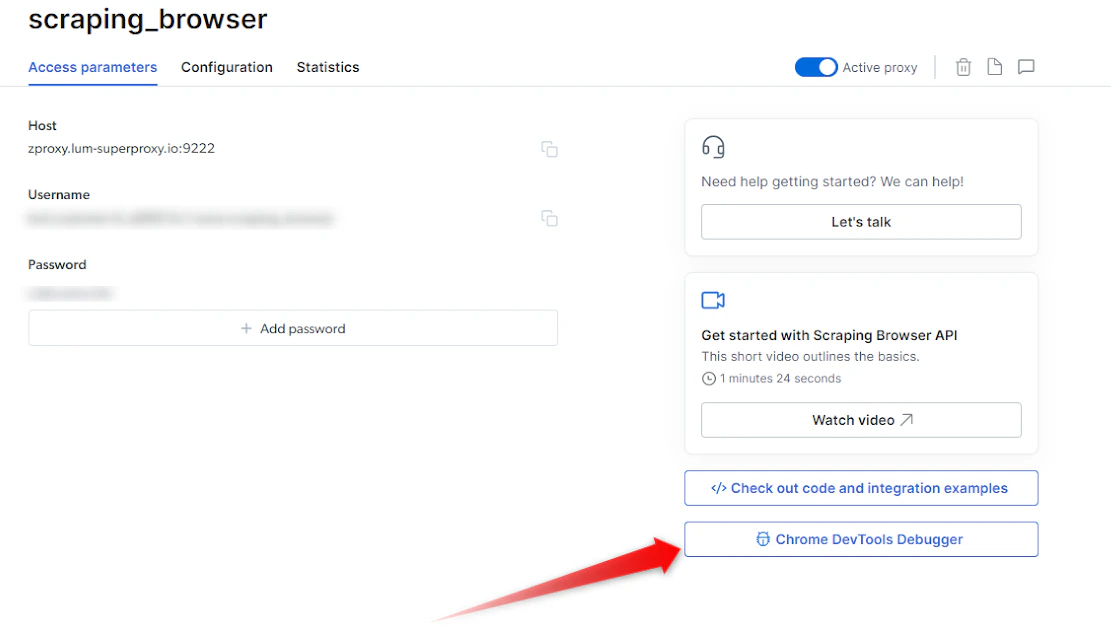
可以在 Bright Data 控制面板中轻松访问 Scraping Browser Debugger。请按照以下步骤操作:
- 在控制面板中,转到我的代理视图
- 点击您的 Scraping Browser 代理
- 点击访问参数或概述选项卡
- 在右侧点击 “Chrome 开发工具调试器”按钮
1
打开 Scraping Browser 会话
- 确保有一个活跃的 Scraping Browser 会话
- 如果您还不知道如何启动 Scraping Browser 会话,请参阅我们的快速入门指南: https://docs.brightdata.com/cn/scraping-automation/scraping-browser/introduction
2
启动 Debugger
- 会话启动并运行后,就可以启动 Debugger 了。
- 点击访问参数选项卡中的 Debugger 按钮,启动 Scraping Browser Debugger 界面(参见上面的截图)
3
连接您的实时浏览器会话
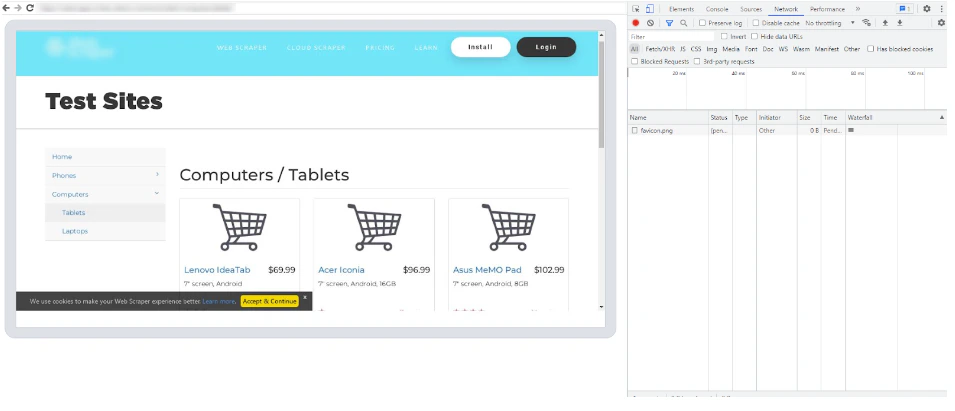
- 在 Debugger 界面中,您将看到实时 Scraping Browser 会话的列表。
- 选择要调试的首选会话
- 点击会话链接或将其复制/粘贴到所选浏览器中,这将在 Debugger 和所选会话之间建立连接。
- 将 Scraping Browser Debugger 连接到实时会话后,您就可以使用 Chrome 开发工具的强大功能了: https://chromedevtools.github.io/devtools-protocol/
-
利用开发工具界面检查 HTML 元素、分析网络请求、调试 JavaScript 代码并监控性能。 利用断点、控制台日志和其他调试技术来识别和解决代码中的问题。
如何在本地自动启动开发工具以查看实时浏览器会话?
如何在本地自动启动开发工具以查看实时浏览器会话?
如果您想在每次会话中自动启动开发工具以查看实时浏览器会话,可以集成以下代码片段:Debugger 演示下面就来看看 Scraping Browser Debugger 的运行情况<inser-video-here>
NodeJS - Puppeteer
如何直观地了解浏览器中发生的情况?
如何直观地了解浏览器中发生的情况?
- 触发屏幕截图
- 在本地启动开发工具
只要在代码中添加以下内容,就能随时轻松触发浏览器截图:要截取 Python 和 C# 的屏幕截图,请参阅此处: https://docs.brightdata.com/cn/scraping-automation/scraping-browser/code-examples
NodeJS
为什么某些页面的初始导航时间比其他页面长?
为什么某些页面的初始导航时间比其他页面长?
解锁目标网站需要大量的“幕后”工作。有些网站只需要几秒钟就能完成导航,而有些网站可能需要长达一两分钟才能完成导航,因为它们需要更复杂的解锁程序。 因此,我们建议将导航超时时间设置为 “2 分钟”,以便在需要时有足够时间完成导航。在脚本中的
page.goto 调用前添加以下一行,即可将导航超时设置为 2 分钟。最常见的错误代码有哪些?
最常见的错误代码有哪些?
我似乎无法连接,是不是连接有问题?
我似乎无法连接,是不是连接有问题?
您可以使用下面的 curl 检查您的连接:如有任何其他问题,请参阅我们的故障排除指南或联系技术支持: https://help.brightdata.com/hc/en-us/requests/new
Shell
如何将 Scraping Browser 与 .NET Puppeteer Sharp 集成?
如何将 Scraping Browser 与 .NET Puppeteer Sharp 集成?
使用 C# 与 Scraping Browser 产品集成需要修补 PuppeteerSharp 库,以添加对 websocket 身份验证的支持。 具体方法如下:
C# PuppeteerSharp
Scraping Browser 支持哪些编程语言?
Scraping Browser 支持哪些编程语言?
Bright Data 的 Scraping Browser 支持多种编程语言和库。目前,我们使用 puppeteer、playwright 和 selenium 为 Node.js 和 Python 提供全面的本地支持,还可以使用下面的其他库集成其他语言,让您可以灵活地将 Scraping Browser 直接集成到您当前的技术栈中。
如何调试 Scraping Browser 会话的幕后情况?
如何调试 Scraping Browser 会话的幕后情况?
您可以实时查看 Scraping Browser 在本地计算机上的运行情况。 这与在 Puppeteer 上将无头浏览器设置为 “FALSE” 类似。网络抓取项目通常需要与目标网站进行复杂的交互,调试对于识别和解决开发过程中发现的问题至关重要。Scraping Browser Debugger是一项宝贵的资源,它使您能够与 Chrome 浏览器开发工具一起检查、分析和微调代码,从而实现更好的控制、可见性和效率。
在哪里可以找到 Scraping Browser Debugger?
在哪里可以找到 Scraping Browser Debugger?
您可以实时查看 Scraping Browser 在本地计算机上的运行情况。这与在 Puppeteer 上将无头浏览器设置为 “FALSE” 类似。我们的 Scraping Browser Debugger 可以通过两种方法启动:通过控制面板手动启动或通过脚本远程启动。利用 Chrome 开发工具
- 通过控制面板
- 通过代码(远程)
可以在 Bright Data 控制面板中轻松访问 Scraping Browser Debugger。
- 在控制面板中,转到我的代理视图
- 点击您的 Scraping Browser 代理
- 点击访问参数或概述选项卡
- 在右侧点击 “Chrome 开发工具调试器”按钮
1
打开 Scraping Browser 会话
- 确保有一个活跃的 Scraping Browser 会话
- 如果您还不知道如何启动 Scraping Browser 会话,请参阅我们的快速入门指南: https://docs.brightdata.com/cn/scraping-automation/scraping-browser/introduction
2
启动 Debugger
- 会话启动并运行后,就可以启动 Debugger 了。
- 点击访问参数选项卡中的 Debugger 按钮,启动 Scraping Browser Debugger 界面(参见上面的截图)
3
连接您的实时浏览器会话
- 在 Debugger 界面中,您将看到实时 Scraping Browser 会话的列表。
- 选择要调试的首选会话
- 点击会话链接或将其复制/粘贴到所选浏览器中,这将在 Debugger 和所选会话之间建立连接。
- 将 Scraping Browser Debugger 连接到实时会话后,您就可以使用 Chrome 开发工具的强大功能了: https://chromedevtools.github.io/devtools-protocol/
-
利用开发工具界面检查 HTML 元素、分析网络请求、调试 JavaScript 代码并监控性能。 利用断点、控制台日志和其他调试技术来识别和解决代码中的问题。
如何在本地自动启动开发工具以查看实时浏览器会话?
如何在本地自动启动开发工具以查看实时浏览器会话?
如果您想在每次会话中自动启动开发工具以查看实时浏览器会话,可以集成以下代码片段:Debugger 演示下面就来看看 Scraping Browser Debugger 的运行情况<inser-video-here>
NodeJS - Puppeteer
如何直观地了解浏览器中发生的情况?
如何直观地了解浏览器中发生的情况?
- 触发屏幕截图
只要在代码中添加以下内容,就能随时轻松触发浏览器截图:要截取 Python 和 C# 的屏幕截图,请参阅此处: https://docs.brightdata.com/cn/scraping-automation/scraping-browser/code-examples
NodeJS
为什么某些页面的初始导航时间比其他页面长?
为什么某些页面的初始导航时间比其他页面长?
解锁目标网站需要大量的“幕后”工作。有些网站只需要几秒钟就能完成导航,而有些网站可能需要长达一两分钟才能完成导航,因为它们需要更复杂的解锁程序。 因此,我们建议将导航超时时间设置为 “2 分钟”,以便在需要时有足够时间完成导航。在脚本中的 “page.goto” 调用前添加以下一行,即可将导航超时设置为 2 分钟。
最常见的错误代码有哪些?
最常见的错误代码有哪些?
我似乎无法连接,是不是连接有问题?
我似乎无法连接,是不是连接有问题?
您可以使用下面的 curl 检查您的连接:如有任何其他问题,请参阅我们的故障排除指南或联系技术支持。
Shell
如何将 Scraping Browser 与 .NET Puppeteer Sharp 集成?
如何将 Scraping Browser 与 .NET Puppeteer Sharp 集成?
使用 C# 与 Scraping Browser 产品集成需要修补 PuppeteerSharp 库,以添加对 websocket 身份验证的支持。 具体方法如下:
C# PuppeteerSharp
Can I choose the country that the Scraping Browser will scrape from?
Can I choose the country that the Scraping Browser will scrape from?
This is possible, but not recommended. The reason is that the Scraping Browser utilises Bright Data’s full suite of unblocking capabilities which automatically chooses the best IP type and location to get you the page you want to access.In case you still want to make the Scraping Browser work from a specific country, simply use the username that includes the country-xx in the configuration.See the example below for Puppeteer: We added -country-us to our request, so we will send a request originating from the United States (“us”).
const SBR_WS_ENDPOINT = 'wss://brd-customer-<customer_id>-zone-<zone_name>-country-us:<password>@brd.superproxy.io:9222'How does the Scraping Browser pricing work?
How does the Scraping Browser pricing work?
Scraping Browser pricing is simple: you only pay for gigabytes of traffic that you transferred through the Scraping Browser.There is no cost for instances or time using the Scraping Browsers - only traffic.It doesn’t matter what country you are using, traffic is billed at the same rates. Because you pay by traffic, you probably will want to minimize it.The only exception to this is premium domains, which cost more per gigabyte, because Bright Data needs to invest a significantly higher amount of effort and resources to unblock. You can find more information about premium domains in your Scraping Browser configuration pages.