

什么是网页抓取工具 API?
什么是网页抓取工具 API?
网页抓取工具 API 让用户可以使用预构建的抓取工具,根据自身需要从网站提取最新数据。 它可自动采集数据,并与其他系统集成。
哪些人使用网页抓取工具 API 可以受益匪浅?
哪些人使用网页抓取工具 API 可以受益匪浅?
任何不想自行开发抓取工具,试图通过其他高效方法采集和分析网页数据,以用于 AI、ML 和大型数据应用程序的数据分析师、科学家、工程师、开发人员和其他个体都能从各种抓取工具 API 中受益,会发现它们大有用处。
如何开始使用网页抓取工具 API?
如何开始使用网页抓取工具 API?
使用网页抓取工具 API 非常简单,开通 Bright Data 账户后,您需要在“账户设置”中生成一个 API 令牌 。
获得密钥后,您可参阅我们的 API 文档 ,查看首次调用 API 的详细指引。generate an API Token, API documentation
各种抓取工具之间有何区别?
各种抓取工具之间有何区别?
不同的抓取工具可能需要设置不同的输入参数以采集数据。 抓取工具主要分为两类: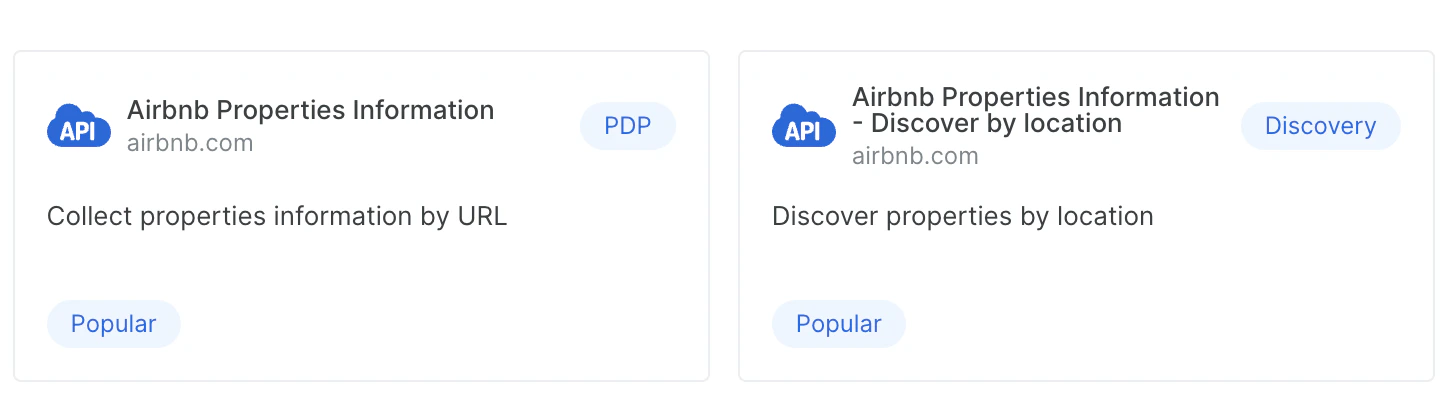
-
PDP
These scrapers require URLs as inputs. PDP 抓取工具可从网页中提取详细的产品信息,例如规格、定价和功能等 -
Discovery/Discovery+PDP
发现型 (Discovery) 抓取工具可让您通过搜索、类别、关键字等探索并查找新的实体/产品。
为何同一个域有不同的数据发现 API?
为何同一个域有不同的数据发现 API?
各种数据发现 API (Discovery API) 让您可以使用不同的方法查找所需数据,例如按关键字、类别、URL 甚至位置来查找相关数据
如何使用网页抓取工具 API 进行身份验证?
如何使用网页抓取工具 API 进行身份验证?
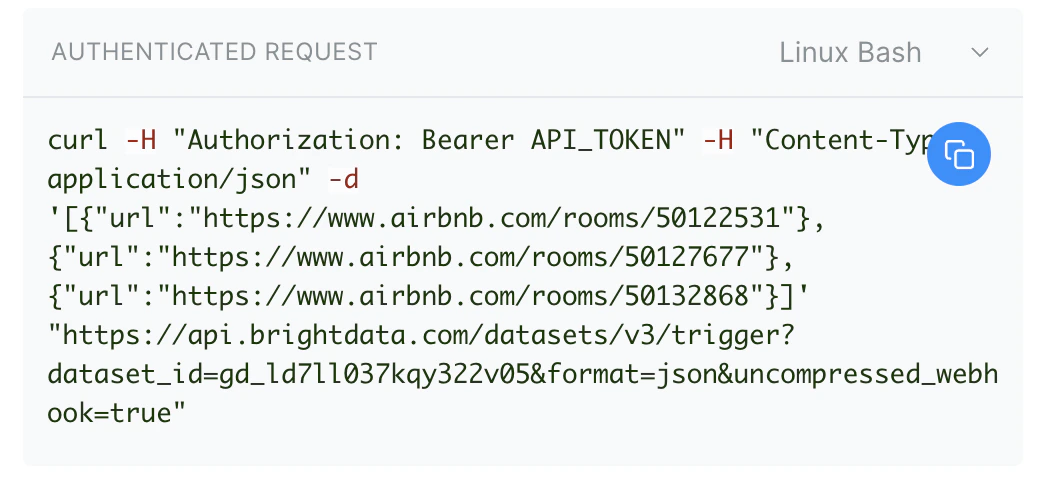
使用 API 令牌即可进行身份验证。 您只需使用以下格式,在请求的 Authorization 标头中包含相关令牌即可:
Authorization: Bearer YOUR_API_TOKEN。如何自定义我的请求并触发它?
如何自定义我的请求并触发它?
选定要运行的 API 后,您可使用我们详细的 API 参数文档自定义您的请求,指定不同的类型以及预期的输入和响应参数。
detailed API parameters documentation
detailed API parameters documentation
试用版如何运行?
试用版如何运行?
您可通过个人账户免费调用 20 次 API 以试用产品,每次调用最多可输入 10 个参数;注意,试用仅针对 PDP 类型的抓取工具(发现型抓取工具不可试用)。
- 前 1-5 次调用会返回完整结果
- 后 6-15 次调用将返回审查后的结果,即部分数据会被隐藏,用星号显示(例如,AB*****YZ)
如何测试 API?
如何测试 API?
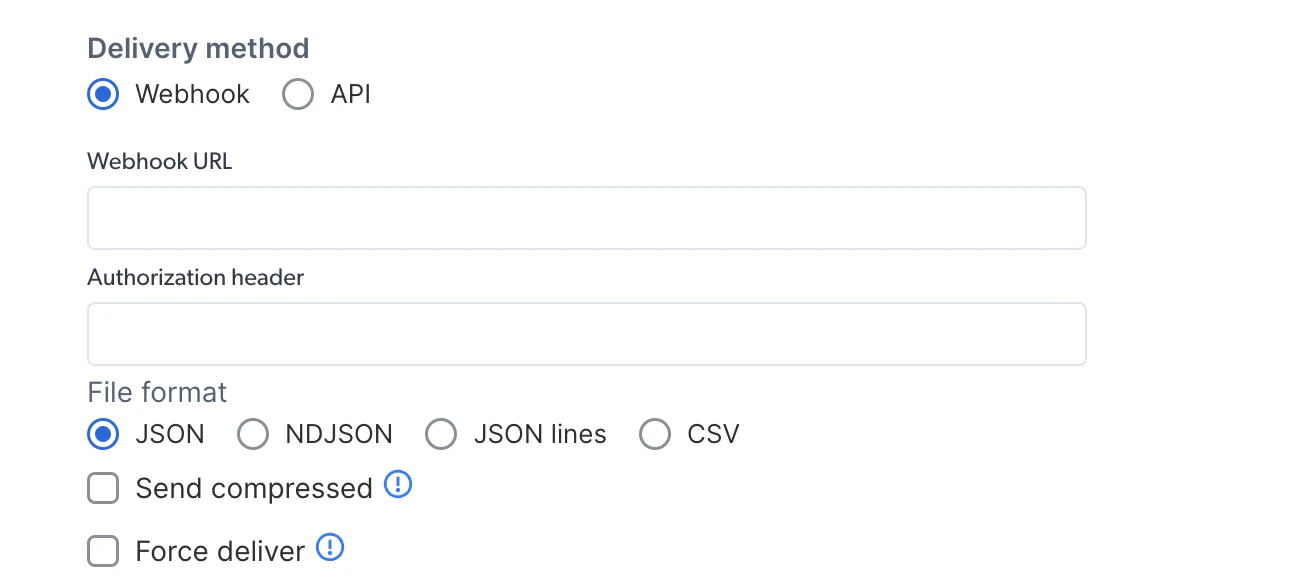
您可以在控制面板上自定义代码,快速测试产品(演示视频)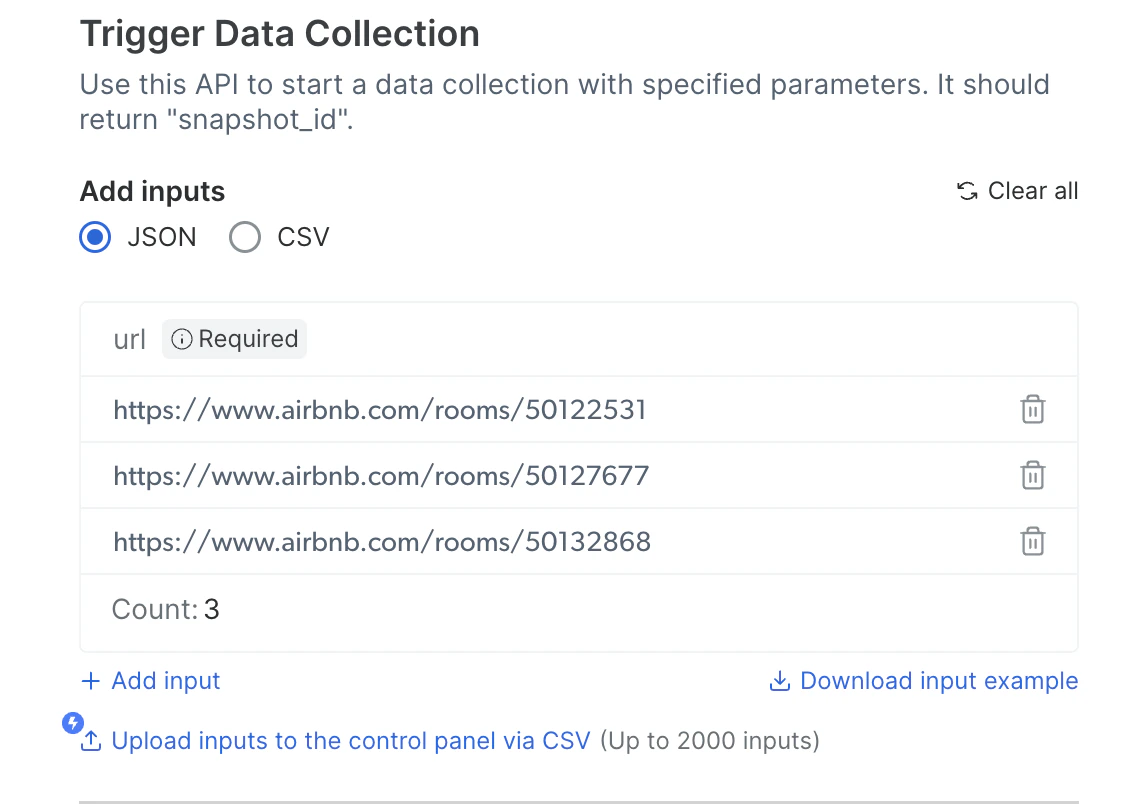

1
从各种 API 中选择所需 API
2
键入输入配置
3
输入 API 令牌
4
选择首选交付方式
5
复制代码并在客户端上运行
网页抓取工具 API 支持哪些数据格式?
网页抓取工具 API 支持哪些数据格式?
网页抓取工具 API 支持多种格式的数据提取,包括 JSON、NDJSON、JSONL 和 CSV。您可在请求参数中指定所需格式。
网页抓取工具 API 的费用是多少?
网页抓取工具 API 的费用是多少?
We charge based on the number of records we delivered, you only pay for what you get, do note that unsuccessful attempts resulting from incorrect inputs by the user will still be billed. Since the failure to retrieve data was due to user input rather than our system’s performance, resources were still consumed in processing the request. The rate per record depends on your subscription plan (starting from 0.7$ per 1000 records). Check our pricing plans or your account details for specific rates.
如果我的 API 令牌过期了,该怎么办?
如果我的 API 令牌过期了,该怎么办?
账户管理员:如果 API 令牌过期,则需在“账户设置”中创建一个新的 API 令牌。

抓取工具 API 如何管理大规模的数据提取任务?
抓取工具 API 如何管理大规模的数据提取任务?
抓取工具 API 具有高并发和批处理功能,在大规模数据提取场景中表现出色。 这确保开发人员可以高效扩展其抓取操作,通过高吞吐量满足海量的数据提取请求。
如何升级订阅的套餐?
如何升级订阅的套餐?
如想升级订阅的套餐,请访问账户控制面板中的“账单”页面,然后选择所需套餐。 如需更多帮助,请联系我们的支持团队。
抓取工具 API 针对哪些特定用例进行了优化?
抓取工具 API 针对哪些特定用例进行了优化?
网页抓取工具 API 可广泛用于各种使用场景,包括竞争基准测试、市场趋势分析、动态定价算法、情绪提取以及为机器学习管道提供数据。 这些 API 对于电子商务、金融科技和社交媒体分析至关重要,有助开发人员高效执行数据驱动型策略。
网页抓取工具 API 的响应速度如何?
网页抓取工具 API 的响应速度如何?
We offer real-time support for scrapers using URLs as inputs, with up to 20 URL inputs, and batch support for more than 20 inputs, regardless of the scraper type.The 网页抓取工具 API delivers real-time data for up to 20 inputs per call, with response times varying by domain, ensuring fresh data without relying on cached information.Scrapers that discover new records (e.g., “Discover by keyword,” “Discover by hashtag”) generally take longer and use batch support, as the actual response times can be influenced by several factors, including the target URL’s load time and the execution duration of user-defined Page Interactions.
How do I cancel an API call?
How do I cancel an API call?
You can cancel a run using the following endpoint:curl -H “Authorization: Bearer TOKEN” -H “Content-Type: application/json” -k “https://api.brightdata.com/datasets/v3/snapshot/SNAPSHOT_ID/cancel” -X POSTMake sure the snapshot id is the one you want to cancel.Note: If you cancel the run no data will be delivered to you and a snapshot can’t be canceled after it finished collecting
What is the difference between a notify URL and a webhook URL configurations?
What is the difference between a notify URL and a webhook URL configurations?
The key difference between a notify URL and a webhook URL in API configurations lies in their purpose and usage:Notify URL:Typically used for asynchronous communication.
The system sends a notification to the specified URL when a task is completed or when an event occurs.
The notification is often lightweight and doesn’t include detailed data but may provide a reference or status for further action (e.g., “Job completed, check logs for details”).Webhook URL:Also used for asynchronous communication but is more data-centric.
The system pushes detailed, real-time data payloads to the specified URL when a specific event occurs.
Webhooks provide direct, actionable information without requiring the client to poll the system.Example Use Case:A notify URL might be used to inform you that a scraping job is finished.
A webhook URL could send the actual scraped data or detailed metadata about the completion directly to you.
For how long a snapshot is available after I triggered a collection?
For how long a snapshot is available after I triggered a collection?
The snapshot is available for 30 days,
you can retrieve the snapshot during this time period via delivery API options and the snapshot ID
是否对特定抓取工具或域名设有限制?
是否对特定抓取工具或域名设有限制?
下列平台存在一定的限制:
Facebook
Instagram
Pinterest
Reddit
TikTok
TikTok
Quora
Quora
Vimeo
Vimeo
X (Twitter)
X (Twitter)
YouTube
YouTube
TikTok
TikTok
只有在同一会话中使用生成的令牌才能访问媒体。
Linkedin
采集的帖子数量仅限于在用户在个人资料中公开显示的数量(例如 10 条)