To access this API, you will need a Bright Data API token
Run a Search
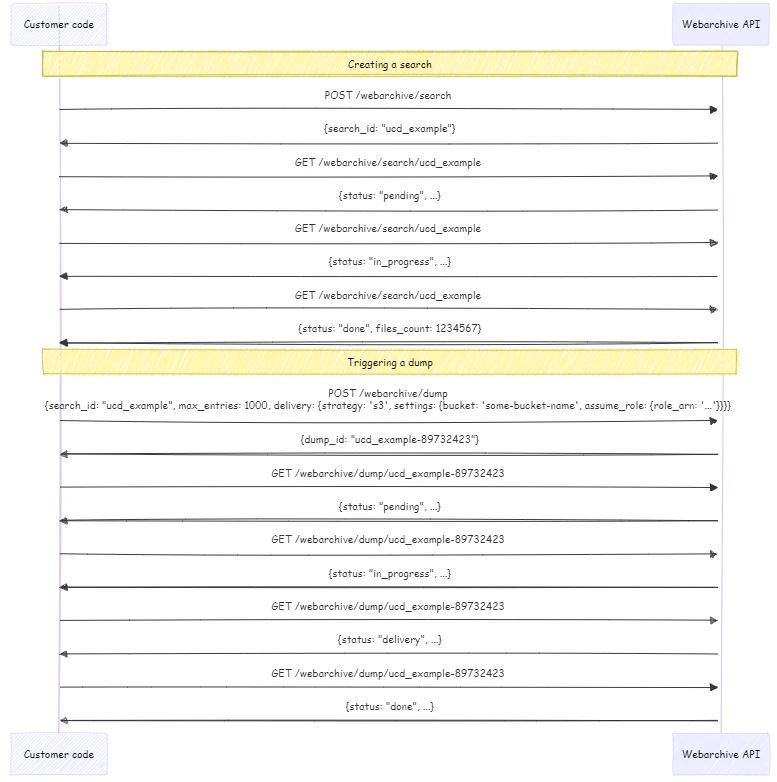
To initiate a search of our Web Archive, use the following/search endpoint.
Endpoint: POST api.brightdata.com/webarchive/search
- Request
- Response
- Code Example
- Dictionary
Request
You can run up to 100 searches per day without triggering a dump.
Once you trigger a dump, that search no longer count against your limit.
Get Search Status
To check the status of a specific query that was made. Endpoint:GET api.brightdata.com/webarchive/search/<search_id>
When successful it will retrieve:
- The number of entries for your query
- The estimated size and cost of the full Data Snapshot
- Request
- Response
- Code Example
Get All Search Statuses
Check the status of all current searches. Endpoint:GET api.brightdata.com/webarchive/searches
- Request
- Response
- Code Example
How data range affects delivery time
If your query is matching data within last 72h - your snapshot will start processing/delivering immediately. If some of your matched data is older than 72h - it needs to be retrieved from a colder archive before delivery and it may take up to 72h.We recommend using
max_age = 1d for initial testing.Deliver Snapshot to Amazon S3 Storage
To use S3 storage delivery, you will first need to do the following:
-
Create an AWS role which gives Bright Data access to your system.
- During this setup, you will be asked by Amazon for an “external ID” that is used with the role.
- Your external ID for S3 is your Bright Data Account ID that can be found within Account Settings
-
Once a role is created, you will need to allow our system delivery role to
AssumeRolethat role.- Our system delivery role is:
arn:aws:iam::422310177405:role/brd.ec2.zs-dca-delivery
- Our system delivery role is:
search_id to S3 storage, use the following /dump endpoint.
Endpoint: POST api.brightdata.com/webarchive/dump
- Request
- Response
- Code Example
Collect Snapshot via Webhook
Collect a Data Snapshot via webhook from a specificsearch_id
Endpoint: POST api.brightdata.com/webarchive/dump
- Request
- Response
- Code Example
Get Status of Data Snapshot
Check the status of a specific Data Snapshot (dump) using the dump_id. Endpoint:GET api.brightdata.com/webarchive/dump/<dump_id>
- Request
- Response
- Code Example
Get the Status of all Data Snapshots
Endpoint:GET api.brightdata.com/webarchive/dumps
- Response
- Code Example
200 OK
High-level process flow diagram