

Search
Localization
Localization
Search type
Search type
Pagination
Pagination
start
Define the result offset - results to start from the selected value. Used for managing pagination.Examples:
start=0(default) - first page of results
start=20- second page of results
start=40- third page of results, etc.
num
Defines the number of results to return.Examples:
num=20(default) - return 20 results
num=50- return 50 results, etc.
Geo-Location
Geo-Location
uule
Stands for the encoded location you want to use for your search and will be used to change geo-location. A CSV with all available uule values can be downloaded here.The value of column “Canonical Name” from the CSV can be used as a raw string to the APIExample:
&uule=New+York,New+York,United+States
Device
Device
brd_mobile
Define what device type to be represented in user-agent. Default or
brd_mobile=0 will provide random desktop user-agent while brd_mobile=1 will provide random mobile user-agent.For specific mobile platform provide one of the following values:
brd_mobile=ios- iPhone user-agent (aliasbrd_mobile=iphone)
brd_mobile=ipad- iPad user-agent (aliasbrd_mobile=ios_tablet)
brd_mobile=android- Android phone
brd_mobile=android_tablet- Android tablet
Browser
Browser
brd_browser
Define what browser to be represented in user-agent. Can be combined with
brd_mobile to get according mobile browser. Default will provide random browser.
For specific browser provide one of the following values:
brd_browser=chrome- Google Chrome
brd_browser=safari- Safari
brd_browser=firefox- Mozilla Firefox (not compatible withbrd_mobile=1)
Parsing
Parsing
Hotel search
Hotel search
hotel_occupancy
Number of guests to book a room for (up to 4).
See
brd_occupancy parameter of Hotels which provides more flexibility.Examples:
hotel_occupancy=1- for 1 guest
hotel_occupancy=2(default) - for 2 guests
hotel_dates
Check-in date and check-out date, separated by comma. Format:
YYYY-MM-DD,YYYY-MM-DDExamples:
hotel_dates=2022-05-01,2022-05-03- find rooms available from 1st until 3rd of May, 2022
Search by image (/searchbyimage only)
Search by image (/searchbyimage only)
Multiple requests
Multiple requests
multi
Make parallel requests through our API server using POST request. Parallel requests will be using the same peer and session and can be used for comparison tests, I.e. making an identical pair of requests with 2 different values for a selected parameter
To initiate a request, perform:multi=[{"query":{"q":"pizza","num":20}},{"query":{"q":"pizza","num":100}}]- the same keyword with different num param
multi=[{"query":{"q":"pizza"}},{"query":{"q":"burger"}}]- different keywords
x-response-id header will contain the id of the request so you can use it in the next request to fetch the resultAI Overview
AI Overview
brd_ai_mode=1
Using brd_ai_mode=1 will increase the likelihood of encountering Google’s Generative AI Overviews in your SERP responses (will generally display in ~15-20%+ of results).- To better trigger an AI Overview, your SERP keywords must be relevant to topics that Google considers suitable for generative responses.
- This query parameter is currently supported only on the following Google domains: google.com, google.co.uk, google.co.in, google.com.au, google.ca.
Maps
Localization
Localization
Coordinates
Coordinates
Pagination
Pagination
start
Define the result offset - results to start from the selected value. Used for managing pagination.Examples:
start=0(default) - first page of results
start=20- second page of results
start=40- third page of results, etc.
num
Defines the number of results to return.Examples:
num=20(default) - return 20 results
num=50- return 50 results, etc.
Maps place overview
Maps place overview
fid
Get the results of a Google Maps Place by fid.Use GET request on http://www.google.com/maps/place/data=!3m1!4b1!4m2!3m1!1s with the fid value at the end.Sorting and filtering
Sorting and filtering
Trends
Required Parametersbrd_json=1: Returns parsed JSON results (Trends supports parsed results only).brd_trends=timeseries,geo_map: Retrieves widget data with best success rates.
Widgets
Widgets
Geo
Geo
Localization
Localization
Time range
Time range
date
Time range to search.Available values are:now 1-H- Past hournow 4-H- Past 4 hoursnow 1-d- Past daynow 7-d- Past 7 daystoday 1-m- Past 30 daystoday 3-m- Past 90 daystoday 12-m(default) - Past 12 monthstoday 5-y- Past 5 years2020-07-01 2020-12-31- custom date range
Category
Category
Search type
Search type
gprop
Google property to filter on. Defaults to web search.
Possible values are: images, news, froogle (for Google Shopping), youtubeReviews
Feature id
Feature id
fid
Feature id what you want to fetch reviews to.
fid parameter can be found in knowledge.fid field of google search response.For example:
https://www.google.com/search?q=hilton%20new%20york%20midtown
Localization
Localization
Sorting and filtering
Sorting and filtering
sort
The way reviews are sorted.Possible values are:
sort=qualityScore(default) - most relevant first
sort=newestFirst- newest first
sort=ratingHigh- highest rating first
sort=ratingLow- lowest rating first
filter
Filter keyword. Will respond with reviews that contain specified keyword only.For Example:
filter=awesome- search for reviews containing ‘awesome’ word
Pagination
Pagination
start
Define the result offset - results to start from the selected value. Used for managing pagination.Examples:
start=0(default) - first page of results
start=10- second page of results
start=20- third page of results, etc.
num
Defines the number of results to return.Examples:
num=10(default) - return 10 results
num=20- return 20 results (max).
Lens
Image URL
Image URL
Localization
Localization
Parsing
Parsing
Upload image as file
Upload image as file
Get exact matches
Get exact matches
brd_lens
The brd_lens parameter in your request fetches specific Google Lens tab results by specifying a tab value (e.g. products, homework, visual_matches, exact_matches).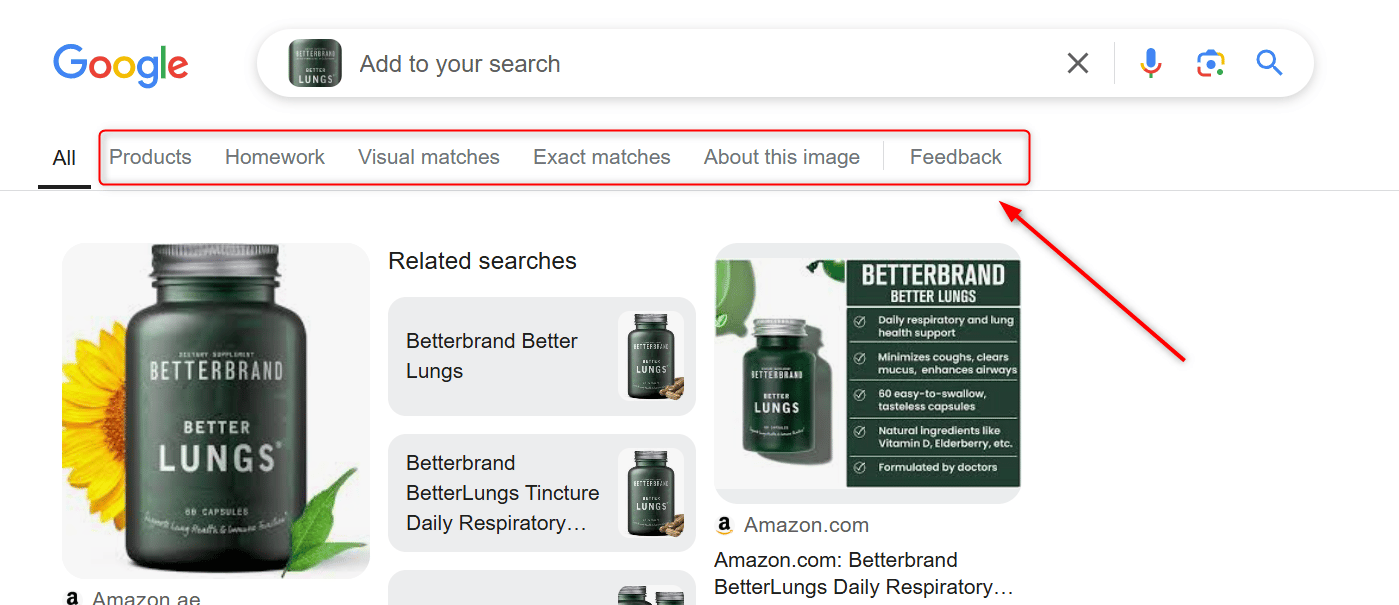
Hotels
Localization
Localization
Booking dates and options
Booking dates and options
brd_dates
Check-in date and check-out date, separated by comma.Format:
YYYY-MM-DD,YYYY-MM-DDExample:
2022-01-20,2022-02-05
brd_occupancy
Number of guests to book a room for (maximum 6 guests).Also supports a comma-separated list of integers where:Examples:
brd_occupancy=1- look for a room for 1 person
brd_occupancy=2(default) - for 2 persons
brd_occupancy=3- for 3 persons, etc.
- first value is a number of adult guests
- subsequent values are ages of children
Format:
brd_occupancy=<number of adults>,<child 1 age>,<child 2 age>,...,<child N age>Examples:
brd_occupancy=1,5,7,12- for 1 adult and 3 children (5, 7 and 12 years old)
brd_occupancy=2,1,3- for 2 adults and 2 children (1 and 3 years old)
brd_free_cancellation
Show only offers with free cancellation.Examples:
brd_free_cancellation=true- with free cancellation
brd_free_cancellation=false(default) - show any offers
brd_accomodation_type
Accomodation type: Hotels or Vacation Rentals.Examples:
brd_accomodation_type=hotels(default) - search for Hotels
brd_accomodation_type=vacation_rentals- search for Vacation Rentals
brd_currency
Currency to show prices at (3-letter code).Examples:
brd_currency=USD- United States Dollars
brd_currency=EUR- Euro
brd_currency=INR- Indian Rupees
Output format
Output format
brd_mobile
Define what device type to be represented in user-agentDefault or brd_mobile=0 will provide random desktop user-agent while brd_mobile=1 will provide random mobile user-agent.For specific mobile platform provide one of the following values:
brd_mobile=ios- iPhone user-agent (aliasbrd_mobile=iphone)
brd_mobile=ipad- iPad user-agent (aliasbrd_mobile=ios_tablet)
brd_mobile=android- Android phone
brd_mobile=android_tablet- Android tablet
brd_json
Bright Data custom parameter allowing to return parsed JSON instead of raw HTMLExamples:
brd_json=1- return results in JSON